Our Short List of 3

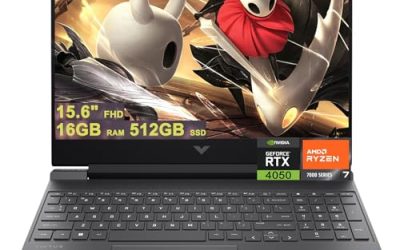
- Best for: Gamers and creators who want strong graphics performance and a fast display.

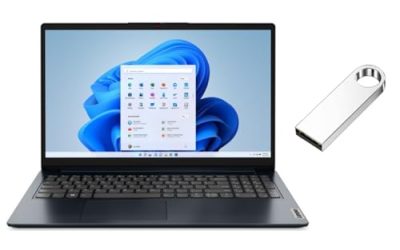
- Best for: Students and professionals who want a slim touchscreen laptop with AI features and solid battery life.
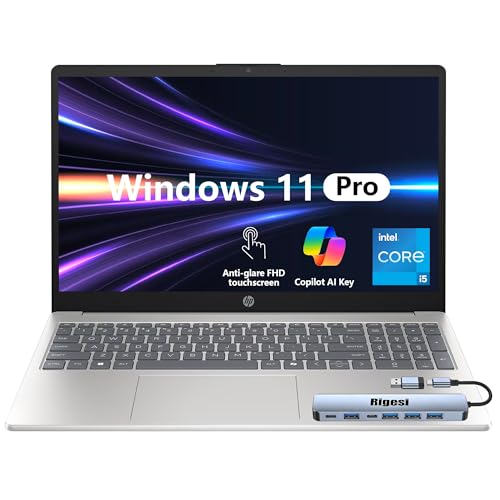
- Best for: Home office workers, students, and families who need a reliable touchscreen laptop for daily tasks.
All 4 Picks at a Glance
| Product | Specs | Action |
|---|---|---|
| ASUS ROG Strix G16 Gaming Laptop |
| Check price on Amazon |
| Lenovo IdeaPad Slim 5 Touchscreen Laptop |
| Check price on Amazon |
| HP 15.6-Inch FHD Touch Laptop |
| Check price on Amazon |
 Apple MacBook Air 13-Inch Laptop with M4 chip |
| Check price on Amazon |
Key takeaways
- Discover the best laptops on sale at Micro Center, from gaming rigs to slim everyday laptops, with specs, buying tips, and top picks for every need and budget.
Micro Center has built its reputation on deep in-store discounts, open-box bargains, and bundle deals that are hard to match online, and laptops are one of the best reasons to walk through its doors. Whether you want a gaming machine with a dedicated graphics card, a slim ultraportable for classes and coffee shops, or a dependable everyday laptop for work and streaming, the best laptops on sale at Micro Center tend to cover every budget and use case. The challenge is knowing which models are genuinely good values and which ones only look cheap on the shelf tag. A low sticker figure means little if the processor is outdated or the memory is too small to multitask. This guide focuses on four laptop types that regularly appear among the best laptops on sale at Micro Center, from a full-power gaming laptop to a featherlight MacBook Air. Based on specifications, features, and user feedback, each pick is judged on processor, graphics, memory, storage, display, and battery life.
Disclosure: As an Amazon Associate, we earn from qualifying purchases.
Quick Picks at a Glance
| Product | Key Spec | Best For |
|---|---|---|
| ASUS ROG Strix G16 | Intel Core i7-13650HX, RTX 4060, 16GB DDR5, 1TB SSD, 16-inch 165Hz display | Gaming and demanding creative work |
| Lenovo IdeaPad Slim 5 | AMD Ryzen AI 5 340, 16GB DDR5, 512GB SSD, 16-inch touchscreen, Wi-Fi 7 | Everyday productivity and AI features |
| HP 15.6-Inch Touch Laptop | Intel Core i5-1334U, 16GB RAM, 512GB SSD, 15.6-inch FHD touchscreen | Work, school, and home office use |
| Apple MacBook Air 13-Inch with M4 chip | Apple M4 chip, 16GB unified memory, 256GB SSD, 13.6-inch Liquid Retina display | Portability and battery life |
How to Choose
1. Match the processor to your workload
Everyday browsing, email, and office documents run comfortably on a modern Intel Core i5, AMD Ryzen 5, or Apple M-series chip. Gaming, video editing, and heavy multitasking benefit from higher-end processors such as the Intel Core i7-13650HX. Check the exact model, since the same series name can hide very different performance.
2. Decide how much graphics power you need
A dedicated card, such as the NVIDIA GeForce RTX 4060 in the ASUS ROG Strix G16, delivers far more gaming power than integrated graphics. Integrated graphics are fine for streaming and office work, and they keep a laptop thin, cool, and long-lasting on battery. Check the stated power limit when gaming matters, since the same chip can run at very different wattages.
3. Get enough memory and storage
Sixteen gigabytes of RAM is the sweet spot for most buyers, letting you keep a browser full of tabs, a video call, and a document open at once without slowdowns. For storage, a 512GB solid-state drive is a sensible minimum, while a 1TB drive suits gamers and creators. Check whether the drive or memory can be upgraded later.
4. Weigh the display
A 15.6-inch or 16-inch full HD screen is a good all-round choice, while a higher refresh rate, such as 144Hz or 165Hz, makes games and scrolling feel noticeably smoother. Touchscreens add convenience for note-taking. Check resolution, refresh rate, and panel type on the specification sheet.
5. Consider battery life and portability
A powerful laptop that dies after a few hours away from a charger is a poor travel companion. Slim ultraportables such as the MacBook Air are built for all-day battery life and easy carrying, while gaming laptops trade battery life for performance and are heavier to carry.
6. Check ports, wireless, and build quality
Look for USB-C, USB-A, HDMI, and a headphone jack at minimum, and note whether the laptop supports Wi-Fi 6, Wi-Fi 6E, or Wi-Fi 7. A backlit keyboard helps in dim rooms, and a fingerprint reader or infrared camera adds quick, secure sign-in.
7. Compare the real sale value
A sale is only a good deal if the configuration is right. Compare the exact model number, not just the brand and screen size, because retailers often discount specific configurations. Micro Center is known for in-store-only offers and open-box stock, so a model one tier up may cost only slightly more than the base version.
Top Picks
ASUS ROG Strix G16 Gaming Laptop
- Best for: Gamers and creators who want strong graphics performance and a fast display.
Gamers and creators who want strong graphics performance and a fast display.
The ASUS ROG Strix G16, model G614JV-AS74, is the gaming heavyweight in this guide and a regular headliner among the best laptops on sale at Micro Center. It pairs a 13th Gen Intel Core i7-13650HX processor with an NVIDIA GeForce RTX 4060 laptop graphics card running at up to 140W maximum TGP, for near-full graphics performance. The 16-inch display runs at 165Hz with a 1920 by 1200 resolution, so fast-paced games look smooth and the taller 16:10 aspect ratio gives extra vertical room for work. Sixteen gigabytes of DDR5 memory and a 1TB PCIe Gen4 solid-state drive provide fast loading and plenty of room for a game library, while Wi-Fi 6E keeps online play speedy. ROG Intelligent Cooling with liquid metal on the processor helps sustain performance during long sessions.
Pros:
– Full-power RTX 4060 graphics at up to 140W maximum TGP
– Fast 165Hz 16-inch display with a 1920 by 1200 resolution
– Strong Core i7-13650HX processor with 16GB DDR5 memory
– Large 1TB PCIe Gen4 SSD and Wi-Fi 6E connectivity
Cons:
– Heavier and bulkier than slim everyday laptops
– Gaming laptops typically offer shorter battery life away from a charger
– Fan noise can rise under heavy gaming loads
Lenovo IdeaPad Slim 5 Touchscreen Laptop
- Best for: Students and professionals who want a slim touchscreen laptop with AI features and solid battery life.
Students and professionals who want a slim touchscreen laptop with AI features and solid battery life.
The Lenovo IdeaPad Slim 5 is a well-balanced everyday laptop for work, study, and home use, and a frequent standout when Micro Center discounts slim Windows machines. This version features a 16-inch full HD Plus touchscreen display, an AMD Ryzen AI 5 340 processor, 16GB of DDR5 memory, and a 512GB solid-state drive. As a Copilot Plus PC, it is built around on-device artificial intelligence features in Windows 11 Home, for on-device help with everyday tasks. The touchscreen adds flexibility for tapping and scrolling, while the infrared webcam supports secure facial sign-in. Lenovo lists up to 11 hours of battery life for this model, and Wi-Fi 7 support keeps wireless connections fast on newer networks. A backlit keyboard rounds out a slim package that is easy to carry.
Pros:
– Large 16-inch touchscreen with a modern Ryzen AI processor
– Copilot Plus PC features built into Windows 11 Home
– Up to 11 hours of battery life and Wi-Fi 7 support
– Backlit keyboard and infrared webcam for secure sign-in
Cons:
– Integrated graphics are not suited to demanding modern games
– 512GB of storage may feel tight for large media libraries
– The 16-inch size is less compact than a 13-inch ultraportable
HP 15.6-Inch FHD Touch Laptop
- Best for: Home office workers, students, and families who need a reliable touchscreen laptop for daily tasks.
Home office workers, students, and families who need a reliable touchscreen laptop for daily tasks.
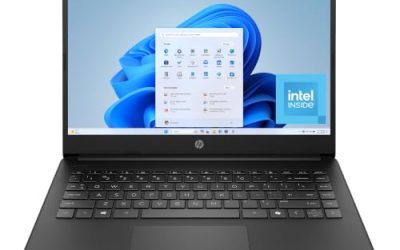
The HP 15.6-inch touch laptop is the practical all-rounder of this guide, aimed at buyers who want a dependable machine for work, school, and everyday home use. It is powered by a 13th Gen Intel Core i5-1334U processor, paired with 16GB of RAM and a 512GB solid-state drive, a combination that handles web browsing, office documents, video calls, and streaming without fuss. The 15.6-inch full HD touchscreen makes navigation intuitive, whether you are tapping through a presentation or scrolling a long document. It also handles video calls and streaming smoothly, making it a solid choice for remote work and family use. Windows 11 Pro is included, which adds business-friendly management and security tools. Wi-Fi 6 support provides reliable wireless connectivity in a clean, professional silver finish.
Pros:
– 13th Gen Intel Core i5 processor with 16GB of RAM
– Responsive 15.6-inch full HD touchscreen display
– Windows 11 Pro with business-friendly features
– 512GB SSD for fast boot times and quick file access
Cons:
– Integrated graphics limit gaming and heavy video editing
– A 15.6-inch laptop is heavier than an ultraportable
– Battery life is modest compared with slim premium laptops
Apple MacBook Air 13-Inch Laptop with M4 chip
- Best for: Travellers, students, and professionals who want a light, quiet laptop with long battery life.
Travellers, students, and professionals who want a light, quiet laptop with long battery life.
The Apple 2025 MacBook Air 13-inch with the M4 chip is the portability pick in this guide and one of the most popular laptops Micro Center stocks for shoppers who value battery life and a lightweight design. It features a 13.6-inch Liquid Retina display, an Apple M4 chip, 16GB of unified memory, and 256GB of SSD storage, all in a thin aluminium body finished here in Sky Blue. The M4 chip handles everyday tasks and light creative work quickly and efficiently while staying cool and quiet, since this model runs without a fan. A 12-megapixel Center Stage camera improves video calls by keeping you framed as you move, and Touch ID provides fast, secure sign-in. It is easy to carry all day, from lectures to meetings to long flights.
Pros:
– Apple M4 chip with 16GB unified memory for fast, efficient performance
– Sharp 13.6-inch Liquid Retina display in a fanless, silent design
– Lightweight Sky Blue aluminium body that is easy to carry
– 12MP Center Stage camera and Touch ID for better calls and security
Cons:
– 256GB of storage is limited for large photo and video libraries
– No dedicated graphics card for demanding games
– macOS may not suit buyers who rely on Windows-only software
Comparison Table
| Laptop | Processor | Graphics | Memory and Storage | Display | Standout Feature |
|---|---|---|---|---|---|
| ASUS ROG Strix G16 | Intel Core i7-13650HX | NVIDIA GeForce RTX 4060 | 16GB DDR5, 1TB SSD | 16-inch, 165Hz, 1920 by 1200 | Full-power gaming graphics |
| Lenovo IdeaPad Slim 5 | AMD Ryzen AI 5 340 | Integrated AMD Radeon graphics | 16GB DDR5, 512GB SSD | 16-inch FHD Plus touchscreen | Copilot Plus AI features and Wi-Fi 7 |
| HP 15.6-Inch Touch Laptop | Intel Core i5-1334U | Integrated Intel graphics | 16GB RAM, 512GB SSD | 15.6-inch FHD touchscreen | Windows 11 Pro for work |
| Apple MacBook Air 13-Inch | Apple M4 chip | Integrated Apple graphics | 16GB unified memory, 256GB SSD | 13.6-inch Liquid Retina | Fanless, lightweight design |
Buying Guide
Start by deciding what the laptop will do most often, because that single choice narrows the field faster than any sale tag. Gamers should prioritise a dedicated graphics card and a high-refresh display, while office workers get more value from a comfortable keyboard, a good screen, and long battery life. Once you know your use case, compare configurations inside your budget range, not just the headline model names. A laptop with 16GB of memory and a 512GB SSD is a better long-term buy than a cheaper machine with half the memory.
Screen size is a trade-off between comfort and portability. A 16-inch laptop gives you more room for split-screen work, but it is heavier in a bag. A 13-inch ultraportable such as the MacBook Air is far easier to carry, yet its smaller screen can feel cramped during long work sessions. If you are unsure, try both sizes in the store and type on each keyboard for a minute.
Storage and memory deserve a careful look on the specification sheet. Check whether the laptop uses a fast solid-state drive and whether the memory is soldered or upgradeable. Some slim laptops cannot be upgraded later, so buy enough up front. Gamers should lean toward 1TB of storage, while everyday users can manage with 512GB if they store most files in the cloud.
Micro Center shoppers should also take advantage of the in-store experience. Ask staff to confirm the exact model number, check whether the unit is new or open-box, and inspect open-box laptops for cosmetic marks and missing accessories. Open-box deals can be excellent value, but only when the condition, warranty, and return window are clear. Ask about bundle offers as well.
Common mistakes are easy to avoid once you know them. Do not buy a laptop based on screen size alone, do not assume every model with the same graphics card name performs the same, and do not overlook battery life if you plan to work away from a charger. Check the warranty length, confirm that the operating system is the version you expect, and make sure the laptop has the ports you need for your monitor, mouse, or external drive.
Frequently Asked Questions
Are Micro Center laptop sales only available in store?
Many of Micro Center’s best laptop offers are in-store only, including open-box deals and bundle discounts that do not appear online. If you see a deal you like, check availability at your nearest store before making the trip, since popular sale models can sell out quickly.
What is the best laptop type to buy on sale at Micro Center?
The best type depends on how you will use it. A gaming laptop such as the ASUS ROG Strix G16 is best for games and demanding creative work, a slim touchscreen model such as the Lenovo IdeaPad Slim 5 suits everyday productivity, and a MacBook Air is ideal for portability and battery life. Choose the category first, then compare specifications.
Is an open-box laptop from Micro Center a good deal?
An open-box laptop can be a good deal when the discount is meaningful and the condition, warranty, and return policy are clearly stated. Inspect the laptop for cosmetic damage, confirm that the charger and accessories are included, and check that the battery and screen work properly.
How much RAM and storage do I need in a sale laptop?
For most buyers, 16GB of RAM and at least 512GB of SSD storage is a sensible target. Gamers and creators should consider 1TB of storage, and buyers with large photo or video collections should plan for extra space or an external drive.
Do I need a dedicated graphics card?
You need a dedicated graphics card if you play modern games, edit video regularly, or use 3D and rendering software. For browsing, office work, streaming, and light photo editing, integrated graphics are sufficient and help keep a laptop thinner, cooler, and longer-lasting on battery.
Conclusion
The best laptops on sale at Micro Center span every kind of buyer, from gamers who need a dedicated graphics card to travellers who want a light machine that lasts all day. For gaming and creative work, the ASUS ROG Strix G16 stands out for its full-power RTX 4060 graphics, fast 165Hz display, and strong Core i7 processor. If you want a modern everyday laptop with a touchscreen and AI features, the Lenovo IdeaPad Slim 5 offers a balanced mix of performance, battery life, and connectivity. For dependable work and school use, the HP 15.6-inch touch laptop delivers a practical combination of a Core i5 processor, 16GB of memory, and Windows 11 Pro. And if portability matters most, the Apple MacBook Air with the M4 chip is hard to beat for its silent, fanless design and long battery life. Compare the exact configurations, check the condition and warranty on any open-box deal, and choose the laptop that matches your daily workload rather than the biggest discount on the shelf.
FAQ
Are Micro Center laptop sales only available in store?
What is the best laptop type to buy on sale at Micro Center?
Is an open-box laptop from Micro Center a good deal?
How much RAM and storage do I need in a sale laptop?
Do I need a dedicated graphics card?
More from Amazon
Programs that pair well with the guide above. Offers and eligibility are set by Amazon and may change.
Free shipping on eligible items, Prime Video and more. Eligible new members can start with a free trial.
Start a Prime free trialAudiobooks and podcasts to listen to on the go. Eligible new members can start with a free trial.
Try Audible freeAd-free music streaming. Eligible new subscribers can start with a free trial.
Try Music Unlimited freeA free business account with business pricing and bulk-buying tools for work, shop or home office.
Create a business accountAs an Amazon Associate we earn from qualifying purchases.