Our Short List of 3

- Best for: Makers who deburr several times a week and want distinct blade profiles instead of duplicates.
- Model: NG1003 (NOGA BURR 3)
- Handle: NG-1 handle
- Blades included: S10, S20 and S35 (3 blades)
- S10 blade use: steel, aluminum and plastic, right-hand cutting

- Best for: Buyers who want one affordable kit that handles print cleanup and household pipe edges with plenty of spare blades.
- Blades included: 11 BS1010 high-speed steel blades (1 installed, 10 extra)
- Blade hardness: HRC64 tempered high-speed steel
- Head: 360° swivel head
- Works on: copper, iron, brass, PVC pipes, 3D printed plastic, resin and metal
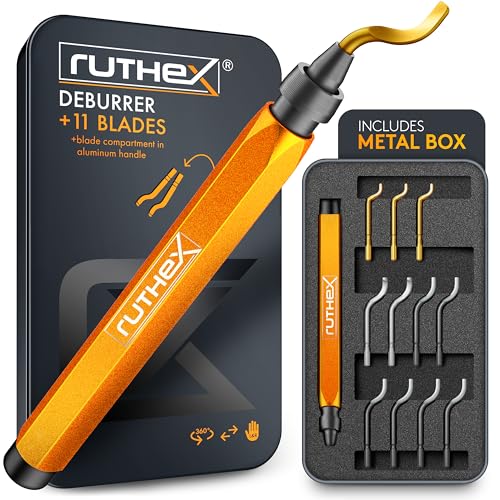
- Best for: Desk-based makers and resin printers who want spares stored in the handle and a metal case for the rest.
- Blades included: 11 blades
- Storage: metal box, plus room for two spare blades inside the handle
- Blade action: 360° rotating blade
- Tool type: manual deburring tool
All 3 Picks at a Glance
| Product | Specs | Action |
|---|---|---|
| NOGA NG1003 Deburring Tool with 3 Blades |
| Check price on Amazon |
| AFA Tooling Deburring Tool Kit with 11 BS1010 Blades |
| Check price on Amazon |
| ruthex Deburring Tool (11 Blades) in Metal Box |
| Check price on Amazon |
Key takeaways
- Compare three deburring tools for 3D printing that clean brims, support scars and sharp edges on PLA, PETG and resin parts, with blade and handle specs from each listing.
The real decision with a deburring tool is not whether it can shave plastic. Almost any swivel blade can. The decision is how much control you keep while it cuts, because a blade that digs in turns a two-second cleanup into a gouged wall or a rounded corner that no longer fits its mating part. Blade steel, handle shape and how the blade is retained matter more than the size of the kit in the box.
This guide is for three kinds of buyers: hobbyists whose FDM prints come off the bed with brim lines and support scars, resin printers cleaning delicate edges, and makers who also want the same tool to tidy copper or PVC pipe on the side. Every pick below was chosen from its Amazon product title and listing details, and each one is a swivel-blade hand tool built around replaceable blades.
Quick Picks
As an Amazon Associate we earn from qualifying purchases.
| Product | Best for | Key spec from title |
|---|---|---|
| NOGA NG1003 Deburring Tool with 3 Blades | Frequent cleanup where control matters most | NG-1 handle with S10, S20 and S35 blades |
| AFA Tooling Deburring Tool Kit with 11 BS1010 Blades | One kit that covers prints and pipe work | 11 BS1010 high-speed steel blades, 360° swivel head |
| ruthex Deburring Tool (11 Blades) in Metal Box | Keeping spare blades stored in the handle | 11 blades, metal box, storage in handle |
How to Choose
Match the blade profile to the edge you actually clean
Most swivel blades share the same basic curved profile, and that profile decides what the tool does well. A general-purpose blade like the BS1010 or NOGA S10 tracks straight edges, curved edges and the rims of holes, which covers brims, elephant foot and support-contact lines on printed parts. Problems start when buyers expect one blade to also scrape flat parting lines or chamfer a hole at a fixed angle. Those jobs need different blade shapes. Check what profiles the kit includes and whether the listing names your print material before assuming a tool fits your workflow.
Blade steel decides how long the edge survives
Deburring blades are consumables, but they do not wear at the same rate. High-speed steel blades tempered to around HRC 62-64 hold an edge far longer on abrasive filled filaments and on metal than plain carbon steel, which dulls quickly and then starts tearing plastic instead of shaving it. A torn edge looks worse than the original burr. If you mostly print PLA and PETG, standard blades in a generous count may serve you fine. If you also clean aluminum or brass fittings, harder M2 or cobalt blades earn their place in the kit.
Handle shape and blade retention affect control
The handle is what keeps a light shaving pass from becoming a gouge. A hexagonal or knurled metal handle resists rolling on the bench and gives your fingers a reference for blade angle, while smooth round handles can rotate mid-pass. Retention matters just as much: a spring-loaded collar or push-in mechanism lets you swap a dull blade in seconds, which means you actually do it instead of forcing a worn blade through the work. Storage inside the handle is a small feature that pays off when the tool travels between bench, printer and toolbox.
Count profiles and spares, not just total blades
Kit sizes are easy to inflate. Eleven blades of one profile is a supply of replacements, not eleven options, and that is fine if your cleanup is repetitive. Three blades in three different profiles can be more useful than a tall stack of identical spares when your parts vary. Read the listing carefully for what is installed, what is spare, and which profiles are included. Also confirm the blade shank size the handle accepts, commonly 3.2 mm on swivel tools, so replacement blades you buy later actually fit the handle you already own.
The 3 Best Options
NOGA NG1003 Deburring Tool with 3 Blades
- Best for: Makers who deburr several times a week and want distinct blade profiles instead of duplicates.
- Model: NG1003 (NOGA BURR 3)
- Handle: NG-1 handle
- Blades included: S10, S20 and S35 (3 blades)
- S10 blade use: steel, aluminum and plastic, right-hand cutting
Makers who deburr several times a week and want distinct blade profiles instead of duplicates.
With only three blades and no bulk spares, heavy users will need to order replacement blades separately once the S10 wears down.
The NG1003 is the pick for people who clean parts often and want a tool that feels deliberate rather than disposable. Instead of a stack of identical spares, it pairs the NG-1 handle with three different blades: the S10 for steel, aluminum and plastic, the S20 for brass and cast iron, and the S35 for straight edges on most materials. That spread suits a bench where printed parts sit next to metal fittings, and where swapping one blade beats owning three separate tools. For pure print cleanup, the S10 does the daily work while the others wait for harder jobs.
AFA Tooling Deburring Tool Kit with 11 BS1010 Blades
- Best for: Buyers who want one affordable kit that handles print cleanup and household pipe edges with plenty of spare blades.
- Blades included: 11 BS1010 high-speed steel blades (1 installed, 10 extra)
- Blade hardness: HRC64 tempered high-speed steel
- Head: 360° swivel head
- Works on: copper, iron, brass, PVC pipes, 3D printed plastic, resin and metal
Buyers who want one affordable kit that handles print cleanup and household pipe edges with plenty of spare blades.
All eleven blades share the BS1010 profile, so there is no second blade shape for scraping or fixed-angle chamfer work.
AFA Tooling’s kit takes the opposite approach to the NOGA: one proven blade profile, supplied in depth. You get eleven BS1010 high-speed steel blades with a 360-degree swivel head, so when a blade dulls you swap it and keep moving instead of nursing a worn edge. The listing positions the tool across copper, iron, brass and PVC pipe as well as 3D printing plastics and resin art, which makes it a sensible single purchase for a bench that splits time between prints and plumbing-style jobs. The blades are tempered HSS rated at HRC64, a hardness figure that supports the longer edge life the brand claims over regular steel.
ruthex Deburring Tool (11 Blades) in Metal Box
- Best for: Desk-based makers and resin printers who want spares stored in the handle and a metal case for the rest.
- Blades included: 11 blades
- Storage: metal box, plus room for two spare blades inside the handle
- Blade action: 360° rotating blade
- Tool type: manual deburring tool
Desk-based makers and resin printers who want spares stored in the handle and a metal case for the rest.
The listing gives less detail on blade steel grade than the other two picks, so confirm the blade specification on the product page if edge life on metal matters to you.
The ruthex tool is built around storage and portability. Eleven blades ride in a metal box, and the handle itself holds two spare blades inside, so a fresh edge is always in your hand when you are working away from the main bench. The 360-degree rotating blade follows curved print edges and hole rims the way swivel tools are meant to, and the listing names metal, resin, steel, PVC and 3D printing as its working materials. For resin printers and FDM hobbyists who tidy parts at a desk rather than a workshop bench, that self-contained layout keeps the whole kit in one grab.
Which One Fits Your Situation
You print functional FDM parts every week
Choose the NOGA NG1003. Elephant foot, brim lines and sharp hole rims are repeat jobs, and the S10 blade covers printed plastic while the handle gives you the control to shave a lip without reshaping the part. The S20 and S35 blades stay ready for the metal fittings that functional projects tend to involve.
You want one tool for prints and pipe jobs
Choose the AFA Tooling kit. Its eleven BS1010 blades and swivel head move from PETG edges to copper and PVC pipe without a tool change, and the deep supply of spares means a dull blade never stalls a weekend project. It is the broadest single kit of the three for mixed household and maker work.
You clean resin prints at a desk
Choose the ruthex tool. Resin edges are light work, and the deciding factor is convenience: spares inside the handle, the rest in a metal box, nothing rattling loose in a drawer. The rotating blade handles the small curves and drain holes common on resin pieces without needing a full workshop setup.
Your parts must fit together precisely
Choose the NOGA NG1003 again, and work slowly. Mating surfaces punish aggressive cleanup, and a controlled handle with a sharp, correct-profile blade removes only the raised lip. Whichever tool you own, test the fit after every few passes instead of finishing the whole edge and discovering you removed too much.
Common Mistakes
- Pressing hard to finish faster, which makes the blade dig in and gouge the wall of the part instead of shaving the raised edge.
- Using a dull blade for weeks; a worn edge tears PLA and PETG and leaves a fuzzy finish that looks worse than the original burr.
- Counting total blades instead of blade profiles, then discovering the kit has eleven copies of one shape and nothing for scraping or chamfering.
- Attacking severe elephant foot or welded supports with a deburring tool when the real fix belongs in first-layer settings or support settings.
- Ignoring hole rims and internal edges, which stay sharp and can crack or cut fingers even after the outside of the part feels smooth.
Frequently Asked Questions
Can a deburring tool damage a 3D printed part?
Yes, if you press too hard or use a dull blade. The swivel blade is designed to follow an edge and shave only raised material, so light pressure and short passes are the safe method. Work on a hidden edge first, check the result, and stop as soon as the edge feels smooth rather than continuing out of habit.
How long does a deburring blade last on printed plastic?
It depends on the filament and the steel. Plain carbon steel blades dull quickly, especially on abrasive filled filaments, while tempered high-speed steel around HRC 62-64 holds an edge through far more parts. A blade that starts tearing or skipping instead of shaving cleanly is telling you it is done, whatever the calendar says.
Is a deburring tool better than sandpaper for support scars?
For raised lines and small support-contact marks, usually yes: it is faster and easier to control, and it removes the lip without rounding the surrounding surface. For broad cosmetic smoothing across a whole face, sandpaper or a scraper still does the better job. Many makers use the deburring tool first and sand only what remains.
Do these tools work on resin prints as well as filament prints?
Yes. The listings for all three picks name resin among their working materials. Resin parts are more brittle than FDM plastic, so use an even lighter touch, support thin sections with your other hand, and let the blade’s swivel action follow the edge instead of forcing it through fragile detail.
FAQ
Can a deburring tool damage a 3D printed part?
How long does a deburring blade last on printed plastic?
Is a deburring tool better than sandpaper for support scars?
Do these tools work on resin prints as well as filament prints?
More from Amazon
Programs that pair well with the guide above. Offers and eligibility are set by Amazon and may change.
Free shipping on eligible items, Prime Video and more. Eligible new members can start with a free trial.
Start a Prime free trialAudiobooks and podcasts to listen to on the go. Eligible new members can start with a free trial.
Try Audible freeAd-free music streaming. Eligible new subscribers can start with a free trial.
Try Music Unlimited freeA free business account with business pricing and bulk-buying tools for work, shop or home office.
Create a business accountAs an Amazon Associate we earn from qualifying purchases.