Key takeaways
- Compare five budget wireless mice by battery life, sensor and connection, from the Logitech M185 and M330 Silent Plus to Amazon Basics and Lenovo picks.
A trackpad is fine for a quick email, but it slows down spreadsheet work, long documents and any day spent hopping between windows. A wireless mouse fixes that for very little money, yet the budget shelf is crowded with near-identical models that differ in the details that actually matter: how long the battery lasts, whether the receiver stores inside the body, how loud the clicks are, and whether the shape suits your hand.
This guide is for laptop owners, students and home-office workers who want a dependable everyday mouse without paying for gaming features they will never use. Every pick below comes from a current Amazon listing, chosen for its connection type, sensor, battery rating and fit, so you can match one to the way you work.
Quick Picks
As an Amazon Associate we earn from qualifying purchases
| Product | Best for | Key spec from title |
|---|---|---|
| Logitech M185 Wireless Mouse | Everyday laptop and desk use | 1000 DPI optical tracking |
| Logitech M330 Silent Plus Wireless Mouse | Quiet offices and shared rooms | SilentTouch clicks with 24-month battery |
| Amazon Basics 2.4 GHz Wireless Optical Mouse | A spare or first wireless mouse | 1600 DPI with receiver stored inside |
| Lenovo 300 Wireless Mouse | Windows laptops at a tidy desk | 1000 DPI and 12-month battery life |
| seenda 2.4G Noiseless Wireless Mouse | Quiet travel use with color options | 1600 DPI and noiseless clicking |
How to Choose
Connection Type and Port Fit
Almost every budget mouse connects through a small USB receiver on the 2.4 GHz band, which pairs instantly with no menus or software. That simplicity has one catch: the receiver needs a USB-A port. Thin laptops that carry only USB-C ports need an adapter before any of these mice will work. A few models add Bluetooth as a second channel, which suits tablets and port-poor laptops. Before you buy, count your free ports and decide whether a dongle can live in one permanently or must travel with the mouse.
Battery Life and Battery Type
Maker ratings in this class run from six months to two years, and the gap matters more than the headline number. A mouse rated for 24 months asks for almost no attention, while a six-month model needs spares on hand several times a year. Check which cell each model takes, because AA and AAA batteries are not interchangeable in a drawer emergency. Auto-sleep modes stretch every rating by cutting power when the mouse sits idle, so a model that sleeps quickly often outlasts a thirstier rival with a bigger number on the box.
Size, Shape and Hand Fit
Compact mice suit smaller hands and slip into a laptop sleeve, but they can cramp a large hand during a full workday. Full-size bodies fill the palm and support the fingers, at the cost of bag space. Shape matters as much as size: ambidextrous models curve the same on both sides and work for left-handed users, while contoured right-handed shells guide the thumb and ring finger into a fixed grip. If you share a desk mouse with a left-handed partner, only the symmetrical designs here will suit you both.
Sensor Speed and Click Noise
Sensor speed is listed in DPI, and for office work the practical range is narrow. A fixed 1000 DPI setting tracks documents and web pages smoothly on a typical laptop screen, while 1600 DPI feels quicker on large or high-resolution monitors. Adjustable DPI helps if you switch between screens, but most budget buyers set it once and forget it. Click noise is the other daily factor: silent-switch models cut the sharp click that carries across a quiet room, which your coworkers, family or fellow library users will appreciate.
The 5 Best Options
Logitech M185 Wireless Mouse

The M185 is the safe default for anyone who wants a mouse that simply works. Its compact ambidextrous body fits mid-size and smaller hands, works for left or right hand use, and drops into a laptop bag without adding noticeable bulk. Setup is a single step: plug the mini receiver into a USB port and the mouse connects on its own. The 1000 DPI optical sensor tracks line-by-line scrolling smoothly on most desk surfaces, and the stated 12-month battery life means a single AA cell covers a year of typical use.
Specs
- Connectivity: 2.4 GHz wireless with USB mini receiver
- Sensor: optical tracking, 1000 DPI
- Battery: 1 AA battery (included), up to 12 months
- Hand orientation: ambidextrous
- Model number: 910-003888
- Weight: 2.65 ounces
- Dimensions: 3.9 x 2.36 x 1.54 inches
- Compatibility: Windows, macOS, Chrome OS and Linux
Best for: Laptop owners who want a proven, compact mouse for daily work and travel.
Watch out for: The receiver is USB-A only, so a laptop with just USB-C ports needs an adapter before this mouse can connect.
ASIN: B00P43PCI8
Logitech M330 Silent Plus Wireless Mouse

Shared rooms change what a good mouse means, and the M330 is built for them. Logitech’s SilentTouch technology keeps the familiar click feel while reducing click noise by over 90 percent, according to the listing, so late-night work stops annoying the next room. The body is a full-size, right-handed contour with rubber grips, a better match for larger hands than the compact picks here. Battery life is the other headline: the listing rates it at up to 24 months, the longest figure in this guide, with auto-sleep helping it get there.
Specs
- Connectivity: 2.4 GHz wireless with USB nano receiver
- Wireless range: 33 feet
- Sensor: optical tracking, 1000 DPI
- Click noise: SilentTouch reduces clicking sounds by over 90 percent
- Battery: 1 AA battery (included), up to 24 months
- Hand orientation: right-handed
- Weight: 91 grams
- Compatibility: Windows, macOS, Chrome OS and Linux
Best for: Anyone working in a quiet office, library or shared living space who wants full-size comfort.
Watch out for: The contoured shell is shaped for right hands only, so left-handed buyers should choose one of the ambidextrous models instead.
ASIN: B01JPOLKDW
Amazon Basics 2.4 GHz Wireless Optical Mouse

This is the pick for buyers who want the lowest-fuss route into wireless: a simple three-button mouse from Amazon’s own Basics line. The optical sensor reaches 1600 DPI, the quickest top speed in this guide, which helps the pointer cross a large monitor without repeated swipes. The nano receiver stows inside the mouse body when it is not plugged in, a small detail that prevents the most common budget-mouse failure, losing the dongle in a bag or drawer. It runs on two AAA batteries, which are included in the box.
Specs
- Connectivity: 2.4 GHz wireless with USB nano receiver
- Wireless range: 10 meters
- Sensor: optical, up to 1600 DPI
- Buttons: 3
- Batteries: 2 AAA (included)
- Hand orientation: ambidextrous
- Model number: MGR0975
- Receiver storage: stows inside the mouse
Best for: A first wireless mouse, a family computer, or a spare kept in a drawer for guests and backup.
Watch out for: It uses AAA cells while most rivals here take a single AA, so check which spares you already keep at home.
ASIN: B005EJH6Z4
Lenovo 300 Wireless Mouse

Lenovo’s 300 keeps the formula deliberately plain, which is exactly its appeal for a tidy office desk. The ambidextrous shell suits either hand, the 2.4 GHz nano receiver connects without software, and the stated battery life matches the M185 at up to 12 months on one AA cell. Cursor speed is fixed at 1000 DPI, so there is no settings button to bump by accident and nothing to configure. For a Windows laptop that lives on one desk, this is a clean, businesslike option from a maker that builds for offices.
Specs
- Connectivity: 2.4 GHz wireless with nano USB receiver
- Sensor: optical, 1000 DPI fixed
- Battery: up to 12 months on 1 AA battery
- Hand orientation: ambidextrous
- Model number: GX30K79402
- Compatibility: PC and laptops with Windows
Best for: Office and home-desk setups where a plain, symmetrical mouse stays paired with one computer.
Watch out for: The listing names Windows compatibility, so Mac and Chromebook buyers should confirm support for their system before ordering.
ASIN: B01MXFA41N
seenda 2.4G Noiseless Wireless Mouse
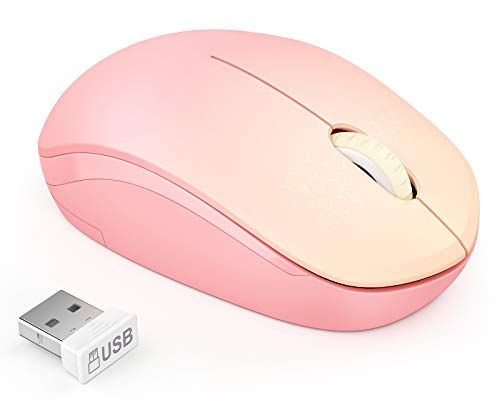
The seenda pick adds two things the plainer models skip: quiet clicks and color. Its switches are designed to be noiseless, and the Gradient Pink finish stands out against the black and grey crowd, with other colors sold on the same listing. The sensor runs at 1600 DPI for brisk pointer movement, and the mouse drops into a sleep mode after 10 minutes of inactivity to save power, waking with a click. The USB receiver stores on the back of the mouse, keeping the pair together in a travel pouch.
Specs
- Connectivity: 2.4 GHz wireless with USB nano receiver
- Wireless range: up to 33 feet
- Sensor: 1600 DPI
- Click style: noiseless switches
- Power saving: sleep mode after 10 minutes idle
- Battery: 1 AA battery required
- Receiver storage: inserted on the back of the mouse
- Color shown: Gradient Pink
Best for: Travelers and students who want quiet clicking and a mouse that is easy to spot in a bag.
Watch out for: The listing notes the AA battery is not included in the package, so add a cell to your order if you have none spare.
ASIN: B08T1P9ZHL
Which One Fits Your Situation
You Work in a Shared or Quiet Room
Pick between the two quiet models by hand fit. The Logitech M330 Silent Plus fills a larger right hand and carries the longest battery rating here, making it the better desk anchor. The seenda mouse is the lighter travel option, with noiseless clicks that keep a library table or a sleeping household undisturbed. Either one removes the click soundtrack that makes a cheap mouse feel cheap.
You Carry a Laptop Between Desks
Portability favors the compact ambidextrous models. The Logitech M185 is small, light and rated for a year on one battery, so it can live in a sleeve pocket full time. The Lenovo 300 matches that battery figure with a plain shell that survives being tossed in a bag. Whichever you choose, leave the receiver plugged into the laptop so the pair never gets separated on the road.
You Need a Spare Mouse for Home
The Amazon Basics mouse is the natural drawer spare. It costs the least effort to set up, its receiver hides inside the body where it cannot be lost, and the 1600 DPI sensor feels quick on a family desktop. Because it takes AAA batteries, keep a small pack beside it and the spare stays ready for a dead main mouse, a visiting laptop or a child’s homework computer.
You Click All Day at One Desk
A full-size body earns its keep over long sessions, and the M330 is the only full-size contour in this set. Its rubber-sided grip and quiet switches suit hours of document work, and the 24-month battery rating means the mouse fades into the background instead of demanding attention. Pair it with a desk surface the optical sensor tracks well, and avoid glass tops.
Common Mistakes
- Buying a compact travel mouse for full-time desk work, then blaming the mouse for a cramped hand by Friday.
- Ordering a receiver-based mouse for a USB-C-only laptop without checking whether an adapter is needed.
- Losing the nano receiver because the chosen model has nowhere to store it inside the body.
- Paying extra for very high DPI figures when documents and browsing never use more than the 1000 to 1600 range.
- Mixing up battery types and discovering the spare drawer holds AA cells while the new mouse needs AAA.
Frequently Asked Questions
Do these mice work with Chromebooks and Macs?
Most do, but check the compatibility line on each listing before ordering. The two Logitech models list Windows, macOS, Chrome OS and Linux support, while the Lenovo 300 names Windows only. Every model here also needs a USB-A port for its receiver, so a computer with only USB-C ports requires an adapter regardless of the operating system.
How long will the battery really last?
Treat the month figures as maker ratings under typical office use, not guarantees. Auto-sleep modes, an on/off switch and modest daily hours help a mouse approach its rating, while heavy daily use shortens it. Keeping one spare cell in the desk means a low battery costs you a minute instead of a workday, whichever model you pick.
Is 1000 DPI enough for everyday work?
For documents, email, web browsing and spreadsheets on a laptop screen, yes. The pointer moves at a controlled pace that most people find natural within a day. Higher settings such as 1600 DPI feel faster on large external monitors, where the pointer has more pixels to cross. Only fast-paced gaming rewards the much higher figures sold on gaming mice.
What should I check if the pointer lags or stops?
Start with the battery, since a fading cell causes most dropouts. Next, move the receiver to a port closer to the mouse or on the same side of the laptop, keep metal objects and other wireless gear away from the path, and try a different surface if the sensor struggles. Re-seating the receiver in another USB port clears most remaining connection hiccups.
FAQ
Do these mice work with Chromebooks and Macs?
How long will the battery really last?
Is 1000 DPI enough for everyday work?
What should I check if the pointer lags or stops?
More from Amazon
Programs that pair well with the guide above. Offers and eligibility are set by Amazon and may change.
Free shipping on eligible items, Prime Video and more. Eligible new members can start with a free trial.
Start a Prime free trialAudiobooks and podcasts to listen to on the go. Eligible new members can start with a free trial.
Try Audible freeAd-free music streaming. Eligible new subscribers can start with a free trial.
Try Music Unlimited freeA free business account with business pricing and bulk-buying tools for work, shop or home office.
Create a business accountAs an Amazon Associate we earn from qualifying purchases.