Our Short List of 3

- Best for: Editors and designers who want the most creative performance per dollar and do not mind a slightly heavier machine.

- Best for: Photographers, colorists, and designers who prioritize display quality and need lots of storage.

- Best for: Video editors and 3D artists who need maximum CPU and GPU performance for demanding projects.
All 4 Picks at a Glance
| Product | Specs | Action |
|---|---|---|
| 1. HP Victus 15 — Best Overall Value for Creators |
| Check price on Amazon |
| 2. ASUS Vivobook Pro 15 OLED — Best Display for Color-Critical Work |
| Check price on Amazon |
| 3. Lenovo LOQ 15 — Best for Heavy Timelines and 3D Work |
| Check price on Amazon |
 4. Acer Swift X 14 — Best Portable Creator Laptop |
| Check price on Amazon |
Key takeaways
- Find the best laptops on sale for graphics and video editing, with RTX graphics, color-accurate OLED displays, fast SSDs and plenty of RAM compared today.
Introduction
Finding the best laptops on sale for graphics and video editing is about matching the machine to the work, not chasing the biggest discount sticker. A laptop that looks like a bargain can turn into a bottleneck the first time you scrub through a 4K timeline or export a layered Photoshop file, while a well-chosen discounted model can handle years of creative projects without complaint. The good news is that the current generation of creator and gaming laptops has pushed dedicated graphics, fast memory, and color-accurate screens into much more affordable territory, and regular sales make those machines even easier to justify.
This guide focuses on laptops that are actually built for creative work: dedicated NVIDIA graphics for GPU-accelerated rendering and effects, at least 16GB of memory for smooth multitasking, fast solid-state storage, and displays that show color you can trust. Every pick below is a complete laptop sold on Amazon, with its specifications verified from the product listing. Before you buy, check the exact configuration on the listing page, because laptop models are sold in many variants that share a name but differ in memory, storage, and graphics.
How to Choose a Laptop for Graphics and Video Editing
Start with the graphics card
The graphics card does the heavy lifting in most creative software. GPU acceleration speeds up timeline playback, effects rendering, color grading, and exports in editors like Premiere Pro, DaVinci Resolve, and After Effects, and it powers 3D rendering and AI-assisted tools in design apps. For 1080p and light 4K editing, an NVIDIA GeForce RTX 3050 is a solid starting point. For smoother 4K timelines, heavier effects stacks, and 3D work, an RTX 4050 with 6GB of dedicated video memory gives you noticeably more headroom. Integrated graphics can handle basic photo edits and short clips, but they will struggle with the kind of projects this guide is built around.
Do not skimp on memory
Video editing software is hungry for RAM. Sixteen gigabytes is the practical minimum for comfortable 1080p and 4K editing with a browser and a few other apps open, and it is the amount every laptop in this guide ships with or exceeds. Twenty-four gigabytes, as found on the ASUS pick below, gives you extra breathing room for large Photoshop documents, multiple timelines, and virtual machines. If a laptop lets you upgrade memory later, that is a bonus, but many slim models solder the RAM in place, so buy the amount you need up front.
Storage speed and size matter
A fast NVMe solid-state drive shortens project loading, media import, and export times, and it makes the whole system feel more responsive. A 512GB SSD is the minimum worth considering for creative work, because raw video and project files grow fast, and a 1TB or 2TB drive is better if you keep several projects on the machine at once. Check whether the laptop has a second storage slot or an easy upgrade path, and plan on an external drive for archiving finished projects either way.
The display is a creative tool
Color accuracy is where many otherwise good laptops fall short. An OLED panel with wide color gamut coverage, like the ones on the ASUS and Acer picks below, shows deep blacks and vivid, accurate color that makes grading and retouching far more reliable. A high-refresh IPS panel with full sRGB coverage is the next best thing and works well for editing and general design. Whichever you choose, look for a Full HD resolution or better, at least 300 nits of brightness for working near windows, and an anti-glare coating if you edit in bright rooms.
Cooling, ports, and battery
Sustained creative work pushes a laptop hard, so cooling matters. Machines with dual fans and proper vents hold their performance during long exports instead of throttling after a few minutes. For ports, look for at least one USB-C port, an HDMI output for an external monitor, and enough USB-A ports for a mouse, keyboard, and external drive. Battery life is rarely spectacular on powerful creator laptops, so treat it as a bonus rather than a deciding factor, and plan to work plugged in for heavy sessions.
Buying on sale without regret
A sale price only helps if the configuration is right. Compare the exact processor, graphics card, memory, and storage on the listing against the specs in this guide, and beware of listings that bundle extra accessories or upgraded memory from third-party sellers, since those change what you are actually buying. Check the seller, the return policy, and the warranty, and confirm whether the machine ships with Windows 11 Home or another edition. The best deals usually appear during major seasonal sales, but the models below are strong values at their regular discounted prices too.
Top Picks
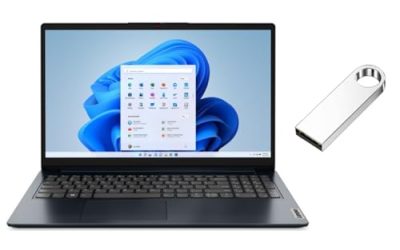
1. HP Victus 15 — Best Overall Value for Creators
- Best for: Editors and designers who want the most creative performance per dollar and do not mind a slightly heavier machine.
Editors and designers who want the most creative performance per dollar and do not mind a slightly heavier machine.
The HP Victus 15 is the most balanced creator laptop in this guide. Its Ryzen 7 7445HS processor has six cores that handle multi-threaded exports and background tasks well, and the RTX 4050 brings hardware encoding, ray tracing support, and CUDA acceleration to editing and 3D software. Sixteen gigabytes of DDR5 memory and a 512GB SSD keep projects moving, while the 144Hz IPS display makes timeline scrubbing feel smooth and responsive.
At just over five pounds, the Victus 15 is portable enough to carry between home, studio, and class, and its 70Wh battery is generous for a machine in this class. The backlit keyboard is useful for late-night editing sessions, and the port selection covers the essentials with HDMI 2.1, USB-C, two USB-A ports, and Ethernet. DTS:X Ultra audio is a nice bonus for video work where sound matters.
Pros:
– Strong RTX 4050 graphics for the price, with hardware encoding for faster exports
– Six-core Ryzen 7 processor handles multitasking and rendering well
– Smooth 144Hz display and large 70Wh battery
– Good port selection, including HDMI 2.1 and Ethernet
Cons:
– Full HD resolution rather than a higher-resolution or OLED panel
– At 5.06 pounds, it is heavier than ultraportable creator laptops
– This listing appears to include a bundled hub accessory, so confirm exactly what is included and who the seller is before buying
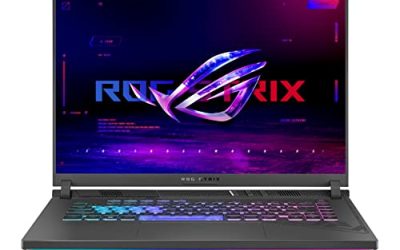
2. ASUS Vivobook Pro 15 OLED — Best Display for Color-Critical Work
- Best for: Photographers, colorists, and designers who prioritize display quality and need lots of storage.
Photographers, colorists, and designers who prioritize display quality and need lots of storage.
The ASUS Vivobook Pro 15 OLED is built around its screen, and that screen is the reason to choose it. An OLED panel delivers the deep blacks, high contrast, and vivid color that make photo retouching and color grading far more trustworthy than on a standard laptop display. If your work lives or dies on accurate color, this is the most important feature on this list.
The hardware backing it up is serious as well. The 16-core Intel Core Ultra 9 185H processor chews through exports and multitasking, 24GB of DDR5 memory is more than the other picks in this guide, and a 2TB SSD means you can keep large projects and media libraries on the machine instead of juggling external drives. The RTX 3050 handles GPU-accelerated effects and light 4K editing, and Thunderbolt 4 gives you a fast connection to external storage and monitors.
Pros:
– Gorgeous OLED display with the contrast and color accuracy creators need
– Powerful 16-core processor and generous 24GB of memory
– Huge 2TB SSD, twice the storage of most picks in this guide
– Thunderbolt 4 for fast external drives and displays
Cons:
– RTX 3050 graphics are a step below the RTX 4050 in the other picks for heavy 4K and 3D work
– OLED panels need care to avoid static image retention over very long sessions
– Premium configuration, so watch for sale pricing to get the best value
3. Lenovo LOQ 15 — Best for Heavy Timelines and 3D Work
- Best for: Video editors and 3D artists who need maximum CPU and GPU performance for demanding projects.
Video editors and 3D artists who need maximum CPU and GPU performance for demanding projects.
The Lenovo LOQ 15 pairs an eight-core Ryzen 7 8845HS processor with the RTX 4050, which makes it the strongest all-rounder in this guide for demanding timelines. Eight cores help with rendering, encoding, and running editing software alongside other apps, and the dedicated graphics card keeps effects and playback smooth.
The display is a pleasant surprise at this level: a 144Hz IPS panel with full sRGB coverage, which is the color standard most web and video work is delivered in. That combination of refresh rate and color coverage makes it a good fit for both editing and the occasional gaming session. The 512GB SSD and 16GB of memory match the other picks, and the inclusion of HDMI and USB-C covers external monitor setups.
Pros:
– Eight-core processor is the strongest CPU in this guide for rendering
– RTX 4050 graphics with 6GB of video memory for effects and 3D
– Full sRGB display coverage for reliable color on web and video delivery
– Solid build and straightforward, no-nonsense design
Cons:
– 512GB of storage fills up fast with 4K footage, so plan for external storage
– Heavier and bulkier than the slim creator laptops in this guide
– No OLED option, so color-critical print work needs an external monitor
4. Acer Swift X 14 — Best Portable Creator Laptop
- Best for: Creators who travel or work in different locations and want a powerful, color-accurate laptop that stays portable.
Creators who travel or work in different locations and want a powerful, color-accurate laptop that stays portable.
The Acer Swift X 14 is the pick for creators who work on the move. It squeezes a 16-core Intel Core Ultra 7 processor and an RTX 4050 into a compact 14.5-inch chassis, which is an impressive amount of power for a laptop you can comfortably carry all day. The combination of a high-resolution OLED display and dedicated graphics makes it equally at home editing photos in a cafe and rendering video at a desk.
The display deserves special attention. At 2880 x 1800 resolution with a 120Hz refresh rate, Calman verification, and full DCI-P3 color coverage, it is the sharpest and most color-capable screen in this guide, and the wider DCI-P3 gamut is the standard used for cinema and high-end video delivery. Sixteen gigabytes of fast LPDDR5X memory and a 512GB SSD round out a well-balanced specification sheet.
Pros:
– Stunning 2.8K OLED display with DCI-P3 coverage and Calman verification
– RTX 4050 graphics and a 16-core processor in a portable 14.5-inch body
– Sharp high-resolution screen shows fine detail in photos and timelines
– Premium, slim design that travels well
Cons:
– Smaller screen than the 15.6-inch picks, which matters for complex timelines
– Memory is soldered, so the 16GB cannot be upgraded later
– Compact chassis means fans work harder under sustained heavy loads
Comparison Table
| Laptop | Display | Processor | Graphics | Memory | Storage |
|---|---|---|---|---|---|
| HP Victus 15 | 15.6-inch Full HD IPS, 144Hz | AMD Ryzen 7 7445HS, 6 cores | RTX 4050, 6GB | 16GB DDR5 | 512GB SSD |
| ASUS Vivobook Pro 15 OLED | 15.6-inch Full HD OLED | Intel Core Ultra 9 185H, 16 cores | RTX 3050 | 24GB DDR5 | 2TB SSD |
| Lenovo LOQ 15 | 15.6-inch Full HD IPS, 144Hz, 100% sRGB | AMD Ryzen 7 8845HS, 8 cores | RTX 4050, 6GB | 16GB | 512GB SSD |
| Acer Swift X 14 | 14.5-inch OLED, 2880 x 1800, 120Hz, DCI-P3 | Intel Core Ultra 7 155H, 16 cores | RTX 4050, 6GB | 16GB LPDDR5X | 512GB SSD |
FAQ
How much RAM do I need for video editing?
Sixteen gigabytes is the practical minimum for comfortable editing in 1080p and 4K, and it is what every laptop in this guide provides. If you work with large Photoshop files, multiple timelines, or 3D scenes, 24GB or more gives you useful headroom. Since many slim laptops solder their memory in place, choose the amount you need when you buy rather than planning to upgrade later.
Is a gaming laptop good for video editing?
Yes, in most cases. Gaming laptops and creator laptops share the same core ingredients: a powerful multi-core processor, a dedicated graphics card, plenty of memory, and fast storage. The main difference is the display. Creator-focused models often have better color accuracy and OLED panels, while gaming models prioritize refresh rate. For video editing, either works well as long as the graphics card and display meet your needs.
Does an OLED display really matter for graphics work?
It matters most for color-critical work such as photo retouching, color grading, and print design. OLED panels produce deeper blacks and wider color gamuts than standard IPS screens, which makes it easier to judge exposure and color accurately. For general editing and web delivery, a good IPS panel with full sRGB coverage is perfectly adequate.
What storage setup works best for editing?
A fast internal NVMe SSD of at least 512GB is the starting point, with 1TB or 2TB giving you room to keep active projects on the machine. Keep finished projects on an external drive or network storage to free up space, and use the internal drive for whatever you are actively editing. A second internal slot, where available, is a useful upgrade path.
When is the best time to buy a laptop on sale?
Major seasonal sales events are the most reliable time to find deep discounts on creator laptops, but individual models also go on sale throughout the year when new versions launch. Before buying, verify the exact configuration on the listing, confirm the seller and return policy, and compare the sale configuration against the specifications in this guide so you know exactly what you are getting.
Conclusion
The best laptops on sale for graphics and video editing balance dedicated graphics, enough memory, fast storage, and a display you can trust with color. The HP Victus 15 offers the strongest overall value, the ASUS Vivobook Pro 15 OLED leads on display quality and storage, the Lenovo LOQ 15 brings the most CPU power for heavy timelines, and the Acer Swift X 14 packs serious creative performance into a portable body. Any of the four will handle real creative work well. Choose based on whether you value display accuracy, raw rendering power, storage space, or portability most, verify the exact configuration on the listing before you buy, and you will end up with a machine that earns its keep for years.
Disclosure: As an Amazon Associate, we earn from qualifying purchases.
FAQ
How much RAM do I need for video editing?
Is a gaming laptop good for video editing?
Does an OLED display really matter for graphics work?
What storage setup works best for editing?
When is the best time to buy a laptop on sale?
More from Amazon
Programs that pair well with the guide above. Offers and eligibility are set by Amazon and may change.
Free shipping on eligible items, Prime Video and more. Eligible new members can start with a free trial.
Start a Prime free trialAudiobooks and podcasts to listen to on the go. Eligible new members can start with a free trial.
Try Audible freeAd-free music streaming. Eligible new subscribers can start with a free trial.
Try Music Unlimited freeA free business account with business pricing and bulk-buying tools for work, shop or home office.
Create a business accountAs an Amazon Associate we earn from qualifying purchases.