Our Short List of 3

- Best for: Office workers and writers who type for hours and want a quiet board that covers a full workday.
- Low-profile wireless keyboard with fluid, precise, quiet typing
- Programmable keys
- Backlit keys
- Bluetooth and USB-C rechargeable

- Best for: Typists who want to swap switches and remap keys without buying a new board.
- Tenkeyless layout, 87 keys
- Hot-swappable Gateron G Pro switches in Red, Brown, or Blue
- QMK and VIA remapping
- Bluetooth 5.1 for up to three devices, plus wired USB-C
- Best for: Gamers who want a fast wireless board that stays slim on the desk.
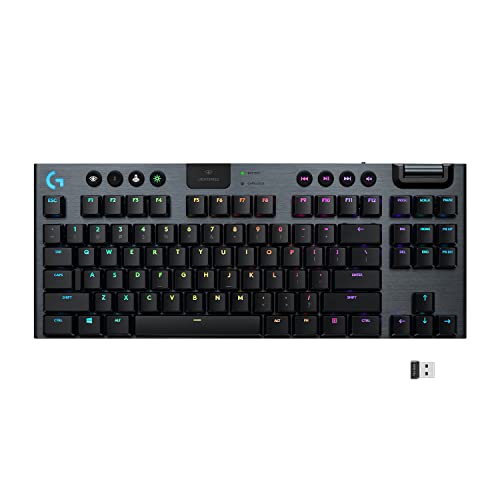
- Tenkeyless Lightspeed wireless RGB mechanical gaming keyboard
- Low-profile GL Linear switches, model 920-009512
- Lightspeed wireless rated at 1 ms, plus Bluetooth and wired USB
- Lightsync RGB with per-key lighting and about 16.8 million colours
All 3 Picks at a Glance
| Product | Specs | Action |
|---|---|---|
| Logitech MX Keys S |
| Check price on Amazon |
| Keychron K8 Pro |
| Check price on Amazon |
| Logitech G915 TKL |
| Check price on Amazon |
Key takeaways
- Three keyboards for the desk: a quiet wireless board for long workdays, a hot-swappable TKL, and a fast wireless gaming board. Switches and layouts compared.
A keyboard is the one part of a desk you touch for hours at a time, so the wrong one nags at you long after the box is gone. The real decision is not which board looks best in a photo; it is how the keys feel under your fingers at the end of a long day, whether the layout fits the way you work, and whether the connection keeps up when you switch from a spreadsheet to a game. Get those three things right and the board disappears into the work.
This guide is for three kinds of buyers: office workers who type for hours, tinkerers who want to swap switches and remap keys, and gamers who want a fast wireless board after work. Each keyboard below was chosen from the name and specifications on its Amazon product page, so you can check the same details yourself before ordering.
Quick Picks
As an Amazon Associate we earn from qualifying purchases
| Product | Best for | Key spec from title |
|---|---|---|
| Logitech MX Keys S | Quiet wireless typing across a full workday | Low-profile wireless keyboard with backlit keys |
| Keychron K8 Pro | Swapping switches and remapping keys | Wireless mechanical keyboard with RGB |
| Logitech G915 TKL | Fast wireless gaming in a compact frame | Tenkeyless Lightspeed wireless RGB mechanical |
How to Choose
Switch feel decides the day
Switches decide how a board feels more than any other part, so start there. Linear switches glide straight down with no bump, which suits fast typing and games. Tactile switches add a small bump that tells your finger the key has registered, and most all-round buyers are happiest here. Clicky switches add a sharp sound on top of the bump, which is satisfying alone and tiring in a shared room. Low-profile switches sit closer to the board and feel closer to a laptop, while tall switches give a deeper travel that many typists prefer. Match the switch to the room you type in, not just the game you play, because the wrong sound wears on everyone nearby.
Layout and size
Layout decides how much desk the board takes and what you give up to save space. A full-size board keeps the number pad, which matters if you enter figures all day, but it pushes the mouse further from your body. A tenkeyless board drops the pad and keeps the function row and arrow keys, freeing real room for the mouse while keeping the keys most people use. A 75 percent board squeezes tighter still and suits small desks, though the keys sit closer together. Measure the space between your monitor stand and the desk edge before you choose, and think about whether you reach for the number pad daily or only once a week.
Connectivity and switching
A board can connect by cable, by Bluetooth, or by a 2.4 GHz receiver, and the right mix depends on how many computers you use. Bluetooth suits switching between a laptop, a tablet, and a desktop without touching a cable, and it is fine for typing and casual games. A 2.4 GHz receiver answers faster and is the mode to use for competitive play, where a missed keypress costs a round. A wired USB-C connection always works and charges the battery while you type. Check the box before you buy: some wireless boards ship with no receiver at all, and a board that only speaks Bluetooth will not suit a desktop with no Bluetooth built in.
Build, keycaps and backlight
Build decides how a board ages after a year of daily typing. An aluminium frame adds weight and keeps the deck flat under hard typing, while a plastic case is lighter and easier to carry between rooms. Double-shot PBT keycaps resist the shine that smooth ABS caps develop where your fingers rest, and their legends are moulded rather than printed, so they do not wear off. Backlighting helps in a dim room, and per-key lighting lets you mark the keys you use most, though a plain white backlight is enough for most desks. A wrist rest helps on long days, so check whether one ships in the box or must be bought separately.
The 3 Best Options
Logitech MX Keys S
- Best for: Office workers and writers who type for hours and want a quiet board that covers a full workday.
- Low-profile wireless keyboard with fluid, precise, quiet typing
- Programmable keys
- Backlit keys
- Bluetooth and USB-C rechargeable
Office workers and writers who type for hours and want a quiet board that covers a full workday.
It uses low-profile scissor switches, not tall mechanical switches, so the feel is very different from a mechanical board if that is what you are used to.
The MX Keys S is the quiet workhorse of this list, built for people who type for hours. Its low-profile keys feel closer to a good laptop keyboard than to a tall mechanical board, with a short, precise travel that keeps wrists relaxed through long documents and late emails. The full-size layout keeps a number pad for figures, the keys light up for dim rooms, and the board pairs with more than one computer so you can move between a work laptop and a home desktop at a keypress. It charges over USB-C, so the same cable that charges a phone tops up the board.
Watch out for: It uses low-profile scissor switches, not tall mechanical switches, so the feel is very different from a mechanical board if that is what you are used to.
Keychron K8 Pro
- Best for: Typists who want to swap switches and remap keys without buying a new board.
- Tenkeyless layout, 87 keys
- Hot-swappable Gateron G Pro switches in Red, Brown, or Blue
- QMK and VIA remapping
- Bluetooth 5.1 for up to three devices, plus wired USB-C
Typists who want to swap switches and remap keys without buying a new board.
Wireless here means Bluetooth only, with no 2.4 GHz receiver in the box, so competitive players who want the lowest wireless lag should look at the gaming pick below.
The K8 Pro is the board to buy if you like changing things. Its sockets are hot-swappable, so switches pull out by hand and new ones press in without soldering, which means the feel of the board can change for the cost of a switch set rather than a new keyboard. It runs QMK and VIA, so every key can be remapped and macros sit a few clicks away. The tenkeyless layout keeps the function row and arrow keys while dropping the number pad, and the aluminium frame with foam inside gives a solid, quieter typing feel than a hollow plastic board. Mac and Windows keycaps are included.
Watch out for: Wireless here means Bluetooth only, with no 2.4 GHz receiver in the box, so competitive players who want the lowest wireless lag should look at the gaming pick below.
Logitech G915 TKL
- Best for: Gamers who want a fast wireless board that stays slim on the desk.
- Tenkeyless Lightspeed wireless RGB mechanical gaming keyboard
- Low-profile GL Linear switches, model 920-009512
- Lightspeed wireless rated at 1 ms, plus Bluetooth and wired USB
- Lightsync RGB with per-key lighting and about 16.8 million colours
Gamers who want a fast wireless board that stays slim on the desk.
The low-profile switches feel closer to a laptop board than a tall mechanical board, so try the travel first if you are used to full-height switches.
The G915 TKL is a gaming board that stays slim enough for a work desk. Its low-profile GL Linear switches give a short, fast travel with a 1.3 mm actuation point, and the Lightspeed wireless link is rated at 1 ms, so the board answers like a wired one in fast games. The tenkeyless frame drops the number pad and keeps the board narrow, which leaves more room for wide mouse sweeps, with per-key Lightsync RGB lighting. A full charge runs for up to 40 hours of play, and the board also connects over Bluetooth or a wired USB cable when you want it to.
Watch out for: The low-profile switches feel closer to a laptop board than a tall mechanical board, so try the travel first if you are used to full-height switches.
Which One Fits Your Situation
You type all day for work
Pick the MX Keys S. Its quiet low-profile keys and full-size layout suit long documents, email, and figures, and the backlit keys help when the light fades in the evening. The board stays comfortable through a full shift because the travel is short and the keys need little force, so wrists tire more slowly than on a tall mechanical board.
You want to change how the board feels
Pick the K8 Pro. Hot-swappable sockets let you try a new switch feel in minutes, and QMK and VIA let you move keys and build macros without buying anything else. It is the only board here that grows with your taste, so a change of mind costs a switch set instead of a whole new keyboard.
You play games in the evening
Pick the G915 TKL. Its 1 ms Lightspeed link and low-profile linear switches answer fast in shooters and racing games, and the narrow tenkeyless frame leaves room for wide mouse movement. The per-key lighting also marks the keys you use most, so you can find them without looking down mid-game.
You switch between two or three computers
Pick the MX Keys S. It pairs with more than one computer and switches between them at a keypress, which suits a work laptop next to a home desktop. The K8 Pro also pairs over Bluetooth with up to three devices, so it is a strong second choice if you want mechanical switches as well.
Common Mistakes
- Buying a clicky board for a shared office, where the sound carries across the room all day.
- Picking a tenkeyless board when you use the number pad for figures every day.
- Judging a board by its lighting instead of its switches and layout, which decide how it feels.
- Assuming every wireless board includes a 2.4 GHz receiver; the K8 Pro here connects over Bluetooth only.
- Choosing a low-profile board and expecting the deep travel of a tall mechanical switch.
Frequently Asked Questions
Is a mechanical keyboard better than a quiet low-profile board?
Neither is better on its own; the right one depends on how you type. A mechanical board gives a deeper travel and a switch feel you can change, which suits tinkerers and many gamers. A quiet low-profile board suits long workdays and shared rooms, where a short travel and soft sound matter more than swap-ability.
Is wireless fast enough for gaming?
Yes, on the right board. A 2.4 GHz link such as Lightspeed is rated at 1 ms, which is effectively the same as wired for most players, and Bluetooth is fine for casual games and typing. Competitive players should use the 2.4 GHz mode or a cable, and should avoid boards that only offer Bluetooth wireless.
What does hot-swappable mean?
Hot-swappable means the switches pull out of the board by hand and new ones press in, with no soldering. The K8 Pro here works this way, so you can change the feel of the keys later or replace a single worn switch instead of replacing the whole keyboard.
Should I choose a full-size board or a tenkeyless one?
Choose full-size if you enter figures daily, since the number pad saves constant reaching for the top row. Choose tenkeyless if you rarely touch the pad, since the narrower board leaves more room for the mouse and keeps your arms closer together.
FAQ
Is a mechanical keyboard better than a quiet low-profile board?
Is wireless fast enough for gaming?
What does hot-swappable mean?
Should I choose a full-size board or a tenkeyless one?
More from Amazon
Programs that pair well with the guide above. Offers and eligibility are set by Amazon and may change.
Send a Prime gift membership to someone who would use free shipping and Prime Video.
Gift Amazon PrimeGive audiobooks to someone who loves to listen. Plans and prices are set by Amazon.
Gift AudibleFree shipping on eligible items, Prime Video and more. Eligible new members can start with a free trial.
Start a Prime free trialAudiobooks and podcasts to listen to on the go. Eligible new members can start with a free trial.
Try Audible freeAs an Amazon Associate we earn from qualifying purchases.