Key takeaways
- Compare five budget HDMI cables by bandwidth, length and certification, from 18Gbps 4K cords to certified 48Gbps 8K picks for TV, console and PC.
A cheap HDMI cable either carries the full signal your TV and source can produce or it quietly becomes the reason for flicker, dropped audio and a 4K picture that falls back to a lower mode. The real decision is bandwidth: a streaming stick needs far less than a PlayStation 5 pushing 4K at 120Hz, and paying for the wrong class wastes money in both directions.
This guide is for buyers wiring a TV, console, soundbar or PC on a budget who want the rating on the box to match the port on their device. The five picks below were chosen from their Amazon listing names and stated specifications, spanning an 18Gbps three-pack for everyday 4K, certified 48Gbps cables for current consoles, and a CL2-rated option for in-wall runs.
Quick Picks
As an Amazon Associate we earn from qualifying purchases
| Product | Best for | Key spec from title |
|---|---|---|
| Amazon Basics HDMI Cable, 3-Pack, 6ft | Wiring several 4K devices at once | 18Gbps High-Speed HDMI 2.0, 4K@60Hz |
| Anker HDMI Cable, 8K@60Hz, 3ft | A short console-to-TV link | 48Gbps Certified Ultra High-Speed |
| Cable Matters Ultra High Speed HDMI Cable, 3-Pack, 6.6ft | Color-coding a home theater rack | 48Gbps certified, 8K@60Hz, 4K@240Hz |
| Monoprice Ultra 8K High Speed HDMI Cable, 6ft | One cable for a PS5 or gaming PC | 48Gbps with Dynamic HDR and eARC |
| Monoprice 8K Certified Ultra High Speed HDMI Cable, 6ft | Runs inside a wall | CL2 in-wall rating, 48Gbps, 30AWG |
How to Choose
Match the bandwidth class to your highest-end device
HDMI cables fall into two practical classes for budget buyers. High-Speed cables carry 18Gbps, enough for 4K at 60Hz, HDR and ARC audio. Ultra High Speed cables carry 48Gbps, which adds 4K at 120Hz, 8K at 60Hz, eARC and variable refresh rate features. Read the bandwidth figure in the listing title rather than the marketing adjectives, then buy for the most demanding device you own today, not the TV alone. Write down the highest format you actually use, such as 4K at 120Hz for gaming or 4K at 60Hz for films, and let that one number settle the class before you compare anything else.
Buy the shortest length that reaches comfortably
Signal quality falls as copper cables get longer, and a coiled spare metre behind a TV traps dust and strains the port. Measure the actual path, including the drop from a wall-mounted screen to the console shelf, then add a small amount of slack for pulling gear out. Three feet suits a streaming stick or a console under the TV; six feet covers most racks; longer runs deserve a thicker gauge. A slightly long cable can be looped once in a wide, gentle curve, while a cable that comes up short has no fix at all.
Look for the certification wording, not just the speed claim
Any seller can print 48Gbps on a box. Certified Ultra High Speed cables have passed the HDMI Forum testing programme and carry a certification label with a scannable code on the packaging. Listings that name the certification, such as the Cable Matters and Monoprice CL2 picks below, give you something checkable. An uncertified cable may still work, but the label is the only proof the full bandwidth was verified. The programme also checks low electromagnetic interference, which is one more reason certified cables behave better around Wi-Fi streaming gear.
Check the jacket, gauge and connector build
A cable that gets unplugged weekly needs strain relief and a jacket that survives being bent behind furniture; braided sleeves resist abrasion, while plain PVC is fine for a fit-and-forget run. Gauge matters on longer lengths: a lower AWG number means thicker conductors, and the 30AWG Monoprice CL2 below is built for fixed installation. Gold-plated or nickel-plated contacts resist corrosion in humid rooms and basements. When a cable arrives, flex the first few inches behind each connector; that joint is where cheap cables fail first, and it should feel firmly anchored rather than loose.
The 5 Best Options
Amazon Basics HDMI Cable, 3-Pack, 6ft

This three-pack suits anyone setting up a living room in one pass: one cable for the streaming box, one for the Blu-ray player and a spare for a laptop. Each cord is a High-Speed HDMI 2.0 cable rated at 18Gbps, which covers 4K at 60Hz with HDR for the devices most homes already own. Because the three cables are identical, swapping one out is also the fastest way to rule a cable in or out when a picture problem appears. The plain black jacket blends into most TV stands and entertainment units.
Specs
- Length: 6 feet per cable, pack of 3
- Bandwidth: 18Gbps, High-Speed HDMI 2.0
- Maximum resolution: 4K@60Hz, 2160p
- Supports Ethernet, 3D and Audio Return Channel
- 48-bit Deep Color support
- Listed compatibility: TV, PS5, Xbox, Roku, Blu-ray players
Best for: equipping a full TV stand with matched 4K cables in one purchase
Watch out for: 18Gbps cannot carry 4K at 120Hz from a PS5 or Xbox Series X, so console owners chasing high refresh rates should pick a 48Gbps cable below
ASIN: B01H7M6YKI
Anker HDMI Cable, 8K@60Hz, 3ft

Anker’s short cable fits the console that sits directly under or beside the TV, where a six-foot cord would only coil and collect dust. It is a certified Ultra High Speed model with the full 48Gbps bandwidth, so it passes 4K at 120Hz for current consoles and 8K at 60Hz for newer displays. The three-foot length also keeps the run tidy inside a media cabinet where longer cables push against the back panel. It leaves room behind the screen for a soundbar cable and the power cords that share the same space.
Specs
- Length: 3 feet
- Bandwidth: 48Gbps, certified Ultra High Speed
- Maximum resolution: 8K@60Hz, plus 4K@120Hz
- Model: A8741 (A8741011)
- Connector: HDMI male to male, 19 pins
- Listed compatibility: PlayStation 5, Xbox, Samsung TVs and more
Best for: a PS5 or Xbox Series X parked close to the screen
Watch out for: measure before ordering, because three feet will not reach from a low rack to a wall-mounted TV
ASIN: B0CFV1T6DS
Cable Matters Ultra High Speed HDMI Cable, 3-Pack, 6.6ft

Cable Matters sells this certified three-pack with color-coded connectors, a small detail that pays off the first time you need to unplug the soundbar rather than the console from the back of a receiver. Each cable carries 48Gbps for 8K at 60Hz and 4K at up to 240Hz, and the 6.6-foot length reaches across most entertainment units. It is the pick for a rack with several current-generation devices that all need full bandwidth.
Specs
- Length: 6.6 feet (2 metres) per cable, pack of 3
- Bandwidth: 48Gbps, Ultra High Speed HDMI Certified
- Maximum resolution: 8K@60Hz, 4K@240Hz
- Supports HDR, Ethernet and ARC
- Specification met: HDMI 2.1, HDCP 2.2
- Model: 300029
Best for: a home theater rack where every input needs full 48Gbps bandwidth
Watch out for: the pack makes sense only if you will use at least two of the three cables; single-device setups pay less for a one-pack
ASIN: B081NXV3ZR
Monoprice Ultra 8K High Speed HDMI Cable, 6ft

Monoprice’s DynamicView cable is the straightforward single purchase for one demanding device: a gaming PC, a PS5 or a high-end streaming box. It carries 48Gbps with Dynamic HDR and eARC support, so a soundbar fed from the TV’s eARC port gets full-quality audio while the picture runs at 4K 120Hz. Six feet reaches from a desk or console shelf to most screens without excess slack coiling behind the stand. It is the cable to buy once for the main screen and then forget about.
Specs
- Length: 6 feet
- Bandwidth: 48Gbps
- Maximum resolution: 8K@60Hz
- Supports Dynamic HDR and eARC
- Connector: HDMI male to male, 19 pins
- Model: 131231, DynamicView Series
- Listed compatibility: monitor, PC, PlayStation, Xbox
Best for: one full-bandwidth link between a console or PC and a 4K 120Hz TV
Watch out for: it is a single cable, so a setup that also needs a soundbar or second source wired should budget for the three-packs above
ASIN: B07WNM2NJ5
Monoprice 8K Certified Ultra High Speed HDMI Cable, 6ft
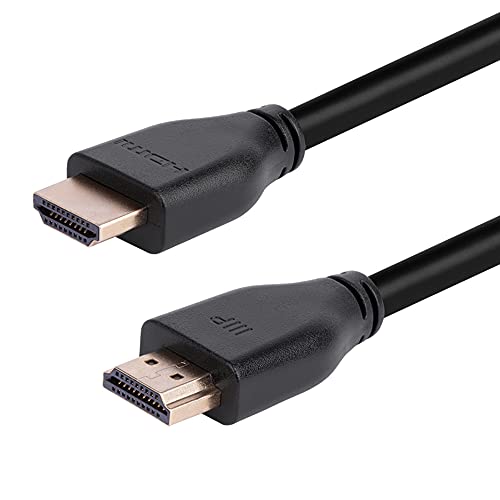
This is the cable to bury in a wall or ceiling. Its CL2 rating covers in-wall installation, the jacket is built around 30AWG conductors, and the cable is certified through an HDMI authorized testing center, which matters when the run will be hard to replace later. It still carries the full 48Gbps feature set, including Dynamic HDR, Dolby Vision and eARC, so a projector or wall-mounted TV gets the same signal as a loose cable would give it.
Specs
- Length: 6 feet
- Bandwidth: 48Gbps, certified Ultra High Speed HDMI 2.1
- Maximum resolution: 8K@60Hz, 4K@120Hz
- CL2 rated for in-wall installation
- Conductor gauge: 30AWG
- Supports Dynamic HDR, Dolby Vision and eARC
- Model: 142674
Best for: permanent in-wall runs to a mounted TV or projector
Watch out for: confirm your local code accepts CL2 for the run you are planning, and test the cable with your actual devices before the wall is closed up
ASIN: B08X6C4MY9
Which One Fits Your Situation
You are connecting a streaming stick and a Blu-ray player
Take the Amazon Basics three-pack. Streaming devices top out at 4K 60Hz, which the 18Gbps rating covers fully, and the third cable stays in a drawer as a known-good spare for troubleshooting. Spending on 48Gbps here buys bandwidth your sources cannot use.
You game on a PS5 or Xbox Series X at 4K 120Hz
Choose the Anker if the console sits beside the TV, or the Monoprice DynamicView for a longer reach. Both carry 48Gbps, which is the bandwidth 4K at 120Hz, variable refresh rate and auto low latency mode require. An 18Gbps cable will quietly limit the console to 60Hz.
You are wiring a TV above a fireplace or a ceiling projector
Use the Monoprice CL2 certified cable. The in-wall rating is the deciding factor, and certification matters most on a run you cannot easily swap. Route it, test every device at full resolution, and only then finish the wall work.
Your receiver has four or five devices plugged into it
The Cable Matters three-pack covers three full-bandwidth inputs with color-coded ends you can identify by touch behind the rack. Pair it with one of the single 48Gbps cables above if a fourth device also needs 4K 120Hz rather than settling for a leftover older cord.
Common Mistakes
- Buying by HDMI version number alone, when the bandwidth figure in Gbps is what decides which resolutions and refresh rates actually work
- Ordering a cable that is too short, then stressing the port with a taut run instead of measuring the real path first
- Assuming a longer cable is a safer buy, even though long copper runs are where sparkles, dropouts and handshake failures show up first
- Mixing up ARC and eARC, then wondering why the soundbar will not pass full-quality audio from the TV
- Closing up a wall before testing an in-wall cable with the exact TV and source it will serve
Frequently Asked Questions
Does a budget HDMI cable affect picture quality?
A working cable either delivers the full digital signal or shows obvious faults such as flicker, sparkles or dropouts; there is no gradual softness. Problems appear when the cable cannot sustain the bandwidth the format needs, which is why matching the Gbps rating to your device matters more than the brand printed on the jacket.
Do I need a 48Gbps cable for a 4K TV?
Only if a source sends more than 4K at 60Hz. Streaming sticks, cable boxes and Blu-ray players work fully on an 18Gbps High-Speed cable. A PS5, Xbox Series X or gaming PC using 4K at 120Hz needs 48Gbps, as does eARC audio at full quality and any 8K display.
What does Ultra High Speed certification actually guarantee?
Certified cables have passed the HDMI Forum testing programme for the full 48Gbps bandwidth and carry a certification label with a scannable code on the packaging. It is the only independently checkable claim on a listing. Uncertified cables are not automatically bad, but their stated bandwidth rests on the seller’s word alone.
Can I use one of these cables in a wall?
Only the CL2-rated Monoprice pick is listed for in-wall installation. Standard cables are not rated for concealed runs, and a failed uncertified cable inside a finished wall means opening the wall to replace it. Test any in-wall cable with your real devices before closing up.
FAQ
Does a budget HDMI cable affect picture quality?
Do I need a 48Gbps cable for a 4K TV?
What does Ultra High Speed certification actually guarantee?
Can I use one of these cables in a wall?
More from Amazon
Programs that pair well with the guide above. Offers and eligibility are set by Amazon and may change.
Free shipping on eligible items, Prime Video and more. Eligible new members can start with a free trial.
Start a Prime free trialAudiobooks and podcasts to listen to on the go. Eligible new members can start with a free trial.
Try Audible freeAd-free music streaming. Eligible new subscribers can start with a free trial.
Try Music Unlimited freeA free business account with business pricing and bulk-buying tools for work, shop or home office.
Create a business accountAs an Amazon Associate we earn from qualifying purchases.