Key takeaways
- best wireless printers on sale: wireless home-office printers for printing, scanning and copying, from fast office models to an ink-tank printer for big jobs.
A wireless printer is bought once and used for years, so the choice matters more than the moment of purchase, yet the moment still decides how much printer the budget buys. The buyer is choosing between a fast office printer that handles documents all day, a compact printer that fits a small desk, a photo-friendly printer with five inks, and an ink-tank printer that prints thousands of pages before the tanks run dry.
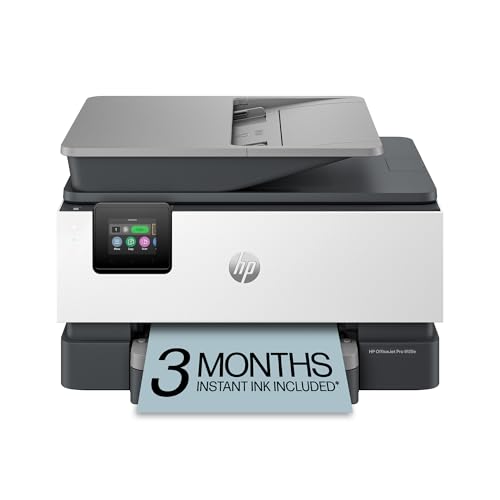

This guide is for households and home offices that want a wireless printer for documents, schoolwork, and photos. It explains how to judge print speed, paper capacity, ink cost, and wireless setup, and when in the year the widest choice is usually available. The four printers below were chosen from the names and specifications on their Amazon pages.
As an Amazon Associate we earn from qualifying purchases.
Quick Picks
Our Short List of 3
- Best for: A busy home office with heavy document printing.
- Inkjet colour multifunction printer
- Up to 22 ppm black printing
- 250-sheet paper tray
- Auto two-sided printing and scanning
- Best for: A household that prints and scans regularly from many devices.
- Inkjet colour multifunction printer
- Up to 20 ppm black printing
- 150-sheet paper tray
- Automatic document feeder

- Best for: Photos and mixed documents where rich colour matters.
- Inkjet colour multifunction printer
- Five-colour ink system
- 200-sheet paper capacity
- Automatic document feeder
All 4 Picks at a Glance
| Product | Specs | Action |
|---|---|---|
| HP OfficeJet Pro 9125e |
| Check price on Amazon |
| Brother MFC-J4335DW |
| Check price on Amazon |
| Canon PIXMA TR8620a |
| Check price on Amazon |
 Epson EcoTank ET-2800 |
| Check price on Amazon |
How to Choose
Match the speed to the workload
Print speed is measured in pages per minute, and the figure to compare is the black speed for documents and the colour speed for photos. A household that prints a few pages a week needs little speed, while a home office that prints reports and homework daily needs a printer that keeps up without a queue forming. Check the black speed on the listing, and remember that the first page takes longer than the rest, since the printer warms up and loads the paper before it starts. A printer that prints 20 pages a minute suits most home offices.
Check the paper tray and the feeder
Paper capacity decides how often the tray needs refilling, and a 250-sheet tray suits a busy home office while a 100-sheet tray suits a household that prints occasionally. An automatic document feeder, or ADF, scans and copies multi-page documents without the owner lifting the lid for each page, which matters for anyone who scans homework, receipts, or contracts. Check whether the feeder handles two-sided documents, since a single-sided feeder forces the owner to flip the pages by hand. The tray size and the feeder are the features that decide whether the printer feels effortless or fiddly, so they deserve as much attention as the speed.
Count the ink cost, not just the printer cost
The printer is the cheap part; the ink is the expensive part, and the cost per page decides the real price over years of use. A cartridge printer suits a household that prints little, since the cartridges last for months and the printer itself costs less, while an ink-tank printer suits a household that prints a lot, since the tanks hold far more ink and the cost per page is much lower. Check how the ink is sold, whether the printer accepts high-yield cartridges, and whether the listing states the page yield of the included ink.
Test the wireless setup before you need it
A wireless printer should join the home Wi-Fi in minutes and stay connected, because a printer that drops off the network is worse than a wired one. Check whether the printer supports the household’s phones and laptops, including AirPrint for Apple devices and Mopria for Android, and whether it offers a mobile app for printing from the phone. A printer with both Wi-Fi and a USB port gives a fallback when the wireless connection fails, and an Ethernet port suits a home office where the printer sits beside the router.
The 4 Best Options
HP OfficeJet Pro 9125e
- Best for: A busy home office with heavy document printing.
- Inkjet colour multifunction printer
- Up to 22 ppm black printing
- 250-sheet paper tray
- Auto two-sided printing and scanning
A busy home office with heavy document printing.
The 250-sheet tray and office features suit a desk with space, so measure the shelf before ordering for a small room.
The HP OfficeJet Pro 9125e is the busy home-office pick, an inkjet colour multifunction printer that prints up to 22 pages a minute in black and holds 250 sheets in its paper tray. Its auto two-sided printing and scanning save paper and time, and the Wi-Fi, Ethernet, and USB connections cover every setup from a wireless home to a wired desk. The large tray means fewer refills during a busy week, and the automatic scanning handles multi-page documents without the owner lifting the lid. It is the printer to choose when the home office prints documents every day and needs a machine that keeps up.
Brother MFC-J4335DW
- Best for: A household that prints and scans regularly from many devices.
- Inkjet colour multifunction printer
- Up to 20 ppm black printing
- 150-sheet paper tray
- Automatic document feeder
A household that prints and scans regularly from many devices.
The 150-sheet tray needs refilling more often than the 250-sheet office printers here, so heavy users should check the tray size first.
The Brother MFC-J4335DW is the household pick, an inkjet colour multifunction printer that prints up to 20 pages a minute in black and scans through an automatic document feeder. Its 150-sheet paper tray suits a family that prints schoolwork, forms, and photos regularly, and the Wi-Fi connection supports cloud printing, mobile printing, AirPrint, and Mopria, so every phone and laptop in the house can print. The automatic feeder copies multi-page documents without the owner lifting the lid for each page. It is the printer to choose when the household wants one machine for printing, scanning, and copying, and when every device should be able to use it.
Canon PIXMA TR8620a
- Best for: Photos and mixed documents where rich colour matters.
- Inkjet colour multifunction printer
- Five-colour ink system
- 200-sheet paper capacity
- Automatic document feeder
Photos and mixed documents where rich colour matters.
A five-colour ink system means five cartridges to replace, so check the cost of the full set before buying.
The Canon PIXMA TR8620a is the photo pick, an inkjet colour multifunction printer with a five-colour ink system that gives photos and mixed documents richer colour. Its 200-sheet paper capacity suits a household that prints both documents and photos, and the automatic document feeder scans multi-page documents without the owner lifting the lid. Wi-Fi support includes AirPrint, Mopria, and the Canon PRINT app, so phones and laptops can print from anywhere in the house. It is the printer to choose when the household prints photos as well as documents and wants the colour to look its best.
Epson EcoTank ET-2800
- Best for: High-volume printing where the ink cost per page matters most.
- Supertank inkjet colour multifunction printer
- High-capacity ink tanks
- Up to 33 ppm black printing
- 100-sheet paper tray
High-volume printing where the ink cost per page matters most.
The 100-sheet tray is the smallest here, so very heavy users will refill it often despite the large ink tanks.
The Epson EcoTank ET-2800 is the high-volume pick, a supertank inkjet colour multifunction printer that prints up to 33 pages a minute in black and holds its ink in high-capacity tanks rather than cartridges. The tanks print thousands of pages before they need refilling, which makes the cost per page far lower than a cartridge printer and suits a household that prints a lot. Its 100-sheet paper tray suits a home that prints regularly rather than in huge batches, and the Wi-Fi connection supports AirPrint and Mopria. It is the printer to choose when the household prints in volume and wants the ink to last.
Which One Fits Your Situation
A busy home office with daily documents
Choose the HP OfficeJet Pro 9125e, because the 22 pages a minute and the 250-sheet tray keep up with a working week, and the auto two-sided printing and scanning save paper and time. The Wi-Fi, Ethernet, and USB connections cover every setup, and the large tray means fewer refills. It suits a desk that prints reports, invoices, and homework every day.
A family that prints from every phone and laptop
Choose the Brother MFC-J4335DW, because the Wi-Fi connection supports cloud, mobile, AirPrint, and Mopria, so every device in the house can print. The automatic document feeder copies multi-page documents without the owner lifting the lid, and the 150-sheet tray suits regular family printing. It is the household machine for schoolwork, forms, and photos.
A household that prints photos as well as documents
Choose the Canon PIXMA TR8620a, because the five-colour ink system gives photos richer colour than a four-colour printer, and the 200-sheet capacity covers both documents and photo paper. The automatic feeder scans multi-page documents, and the Canon PRINT app prints from the phone. It suits a household that values colour and prints a mix of everything.
A household that prints in volume
Choose the Epson EcoTank ET-2800, because the high-capacity ink tanks print thousands of pages before refilling, and the cost per page is far lower than a cartridge printer. The 33 pages a minute keeps up with large jobs, and the Wi-Fi connection covers AirPrint and Mopria. It suits a household that prints a lot and wants the ink to last for months.
Common Mistakes
- Buying a cartridge printer for high-volume printing, then spending more on ink than on the printer itself.
- Ignoring the paper tray size, then refilling a 100-sheet tray every few days.
- Choosing a printer without checking whether the household’s phones support its mobile printing.
- Placing the printer far from the router, where a weak Wi-Fi signal causes slow prints and failed jobs.
- Forgetting the automatic document feeder, then scanning multi-page documents one page at a time.
Frequently Asked Questions
How do I connect a wireless printer to Wi-Fi?
Most wireless printers connect through a setup wizard on the printer’s screen or through the maker’s mobile app, which finds the home network and asks for the password. Place the printer near the router for the first setup, then move it to its final spot and check that the signal still reaches it.
Is an ink-tank printer better than a cartridge printer?
An ink-tank printer is better for households that print a lot, because the tanks hold far more ink and the cost per page is much lower. A cartridge printer is better for households that print little, because the printer itself costs less and the cartridges last for months. The right choice depends on the volume.
What is an automatic document feeder?
An automatic document feeder, or ADF, is a tray on top of the printer that feeds multi-page documents through the scanner without the owner lifting the lid for each page. It matters for anyone who scans homework, receipts, or contracts, because it turns a ten-page scan into a single job.
When is the best time to buy a wireless printer?
Printers are available all year, and the widest choice is usually around the back-to-school and gift-giving months, when makers release new models. The best time to buy is when the household has measured the desk and compared the ink costs. A well-chosen printer lasts for years, so the fit and the ink cost matter far more than the timing.
FAQ
How do I connect a wireless printer to Wi-Fi?
Is an ink-tank printer better than a cartridge printer?
What is an automatic document feeder?
When is the best time to buy a wireless printer?
More from Amazon
Programs that pair well with the guide above. Offers and eligibility are set by Amazon and may change.
Free shipping on eligible items, Prime Video and more. Eligible new members can start with a free trial.
Start a Prime free trialAudiobooks and podcasts to listen to on the go. Eligible new members can start with a free trial.
Try Audible freeAd-free music streaming. Eligible new subscribers can start with a free trial.
Try Music Unlimited freeA free business account with business pricing and bulk-buying tools for work, shop or home office.
Create a business accountAs an Amazon Associate we earn from qualifying purchases.