Our Short List of 3

- Best for: Editors who want the strongest processor in this budget group and are happy to upgrade memory as projects grow.
- Brand: Lenovo
- Model: IdeaPad Gaming 3 15 (82K20015US)
- Processor: AMD Ryzen 5 5600H
- Graphics: NVIDIA GeForce GTX 1650

- Best for: Creators who want to start editing immediately with comfortable memory and storage, without planning upgrades first.
- Brand: HP
- Model: Pavilion Gaming 15
- Processor: AMD Ryzen 5 5600H
- Graphics: NVIDIA GeForce GTX 1650
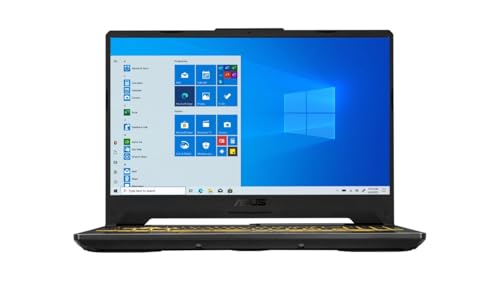
- Best for: Editors who value storage room and a high-refresh screen, and who edit mainly at 1080p.
- Brand: ASUS
- Model: TUF Gaming F15 (FX506LH-AS51)
- Processor: Intel Core i5-10300H
- Graphics: NVIDIA GeForce GTX 1650 with 4 GB GDDR6
All 4 Picks at a Glance
| Product | Specs | Action |
|---|---|---|
| Lenovo IdeaPad Gaming 3 15 |
| Check price on Amazon |
| HP Pavilion Gaming 15 (Renewed) |
| Check price on Amazon |
| ASUS TUF Gaming F15 |
| Check price on Amazon |
 Acer Nitro 5 AN515-54 |
| Check price on Amazon |
Key takeaways
- Compare budget video editing laptops built around GTX 1650 graphics by processor, memory, storage and upgrade room, with honest limits and verified ASINs.
The real decision in this budget segment is accepting what the segment actually contains. No current new laptop with dedicated graphics lives here, so the honest pool is older gaming-class machines, many of them renewed, built around the GTX 1650. That graphics card, paired with an H-series processor, is exactly what makes basic video editing work at this level: it accelerates timeline effects and exports in common editors, while the compromises show up in memory, storage and screen colour rather than in whether the machine can edit at all.
This guide is for new creators cutting their first YouTube and social videos, students editing coursework and club projects, and anyone upgrading from an integrated-graphics laptop that stutters through a timeline. Every model below carries dedicated GTX 1650 graphics and an H-series processor per its Amazon listing, and the article is frank about the ceiling: these are machines for 1080p editing and patient 4K proxy workflows, not for heavy professional colour work.
Quick Picks
As an Amazon Associate we earn from qualifying purchases.
| Product | Best for | Key spec from title |
|---|---|---|
| Lenovo IdeaPad Gaming 3 15 | The strongest processor in this budget group | Ryzen 5 5600H, GTX 1650, 120Hz display |
| HP Pavilion Gaming 15 (Renewed) | Starting with more memory and storage fitted | Ryzen 5 5600H, GTX 1650, 16 GB RAM, 512 GB SSD |
| ASUS TUF Gaming F15 | The largest standard drive in the group | Core i5-10300H, GTX 1650, 512 GB PCIe SSD |
| Acer Nitro 5 AN515-54 | Buyers who plan to add memory and storage later | Core i5-9300H, GTX 1650, spare expansion slots |
How to Choose
Start with the graphics card and the processor together
Video editing leans on both halves of the machine. The GTX 1650 in every model here is the entry point for hardware-accelerated effects and faster exports in popular editing software, and it is the single feature that separates this group from ordinary budget laptops with integrated graphics. The processor drives timeline responsiveness, encoding and everything outside the effects pipeline, so core count and generation matter: the Ryzen 5 5600H machines here are a step ahead of the older Intel models, which is worth weighing if your projects are long or layered.
Treat 8 GB of memory as a starting point, not a finish line
Most listings in this segment ship with 8 GB of memory, and editing software will use all of it and ask for more once a browser, music and a project are open together. The practical question is whether the machine lets you add memory later. Models with an accessible second slot turn a tight purchase into a staged upgrade, while the renewed HP in this group sidesteps the issue by arriving with 16 GB fitted. Before buying any 8 GB configuration, check the listing and the model documentation for its memory layout and maximum supported capacity.
Plan storage around project files, not the operating system
A 256 GB drive holds the system, your editor and a handful of active projects, and then it is full, because raw footage is heavy even at 1080p. A 512 GB configuration buys breathing room, and an empty drive bay or second slot buys a future. Whichever model you choose, adopt the working habit this segment demands: keep the internal drive for active projects, archive finished work to external storage, and never let the system drive sit nearly full, because editing software uses that free space as working room during exports.
Buy the timing and the condition, not just the model
In this segment, when and how you buy matters as much as what you buy. Stock is older and often renewed, so availability shifts, and the year’s major shopping periods are when sellers move this kind of inventory most actively. Decide your minimum specification first: GTX-class graphics, an H-series processor, and a memory upgrade path or 16 GB fitted. Then judge each listing on its stated condition, its included accessories and its return terms. A slightly older model in clearly described condition is a safer purchase than a vaguer listing for a nominally newer one.
The 4 Best Options
Lenovo IdeaPad Gaming 3 15
- Best for: Editors who want the strongest processor in this budget group and are happy to upgrade memory as projects grow.
- Brand: Lenovo
- Model: IdeaPad Gaming 3 15 (82K20015US)
- Processor: AMD Ryzen 5 5600H
- Graphics: NVIDIA GeForce GTX 1650
Editors who want the strongest processor in this budget group and are happy to upgrade memory as projects grow.
The 256 GB drive and 8 GB of memory are both tight for editing, so budget attention for storage habits and a memory upgrade early.
The IdeaPad Gaming 3 carries the newest processor in this group, and that shows where editing feels it most: timeline scrubbing, background rendering and general responsiveness. Its six-core Ryzen 5 5600H pairs with the GTX 1650, and the 120Hz Full HD screen is a bonus for smooth playback and general use. The limits are the familiar ones for this segment: memory and storage both start small, so this is a machine to grow with a memory addition and disciplined archiving rather than one that arrives fully provisioned.
HP Pavilion Gaming 15 (Renewed)
- Best for: Creators who want to start editing immediately with comfortable memory and storage, without planning upgrades first.
- Brand: HP
- Model: Pavilion Gaming 15
- Processor: AMD Ryzen 5 5600H
- Graphics: NVIDIA GeForce GTX 1650
Creators who want to start editing immediately with comfortable memory and storage, without planning upgrades first.
It is a renewed unit, so verify the condition wording, included charger and return terms on the listing before ordering.
This renewed Pavilion Gaming 15 solves the two problems that define the segment, because it arrives with 16 GB of memory and a 512 GB drive already fitted. Underneath sits the same strong pairing as the Lenovo: a Ryzen 5 5600H and GTX 1650 graphics, which makes it the most ready-to-edit configuration here on the day it arrives. The renewed condition is the consideration instead: read the listing’s condition description and return terms carefully, and expect the machine’s presentation to reflect its renewed status rather than a factory-sealed box.
ASUS TUF Gaming F15
- Best for: Editors who value storage room and a high-refresh screen, and who edit mainly at 1080p.
- Brand: ASUS
- Model: TUF Gaming F15 (FX506LH-AS51)
- Processor: Intel Core i5-10300H
- Graphics: NVIDIA GeForce GTX 1650 with 4 GB GDDR6
Editors who value storage room and a high-refresh screen, and who edit mainly at 1080p.
Memory starts at 8 GB, and the processor is an older generation than the Ryzen models, so check the memory upgrade path if your projects are layered.
The TUF Gaming F15 offers the largest standard drive among the new-condition designs here, and its 144Hz screen is the smoothest panel in the group for playback and general use. Its Core i5-10300H and GTX 1650 pairing is a generation behind the Ryzen machines, so long exports take a little longer, but the combination remains well matched to 1080p timelines and proxy-based 4K work. The TUF line’s durable positioning and upgrade-friendly layout also suit a buyer who expects to keep and improve the machine over several years.
Acer Nitro 5 AN515-54
- Best for: Buyers on the tightest budget who are comfortable adding memory and a second drive as their editing grows.
- Brand: Acer
- Model: Nitro 5 AN515-54-5812
- Processor: Intel Core i5-9300H
- Graphics: NVIDIA GeForce GTX 1650 with 4 GB GDDR5
Buyers on the tightest budget who are comfortable adding memory and a second drive as their editing grows.
The starting drive is the joint smallest here and the processor is the oldest in the group, so the upgrade plan is part of the purchase, not an optional extra.
The Nitro 5 is the project machine of the group: its value is less in its starting specification than in how much room Acer leaves to improve it, with an open M.2 slot and a spare drive bay noted for this model. The Core i5-9300H and GTX 1650 pairing handles the same editing tasks as the rest of the group, and the backlit keyboard and Full HD IPS screen cover everyday needs. Buy it as a starting point you intend to grow, with memory and storage additions planned, rather than as a finished editing station.
Which One Fits Your Situation
You are starting a channel and editing at 1080p
Any of these four will do the work, so choose by readiness. The renewed HP arrives with the memory and storage to start immediately, while the Lenovo offers the strongest processor if you expect your projects to grow in length and layers. Keep your first projects at 1080p, learn your editor’s proxy and optimisation settings, and these machines will feel capable rather than compromised.
You edit coursework and club projects alongside classes
Choose the Lenovo IdeaPad Gaming 3 or the ASUS TUF F15. Both balance editing hardware with everyday student use, and their screens and keyboards suit long writing sessions as well as timelines. The Lenovo’s processor is the stronger of the two, while the ASUS gives you double the starting storage, which matters when coursework, media and projects all live on one drive through a whole term.
You want to attempt 4K footage on this budget
Be honest about the workflow: edit with proxy or optimised media, keep effects modest, and expect exports to take their time. The Ryzen-powered Lenovo and HP handle this best in this group thanks to their processor and, in the HP’s case, its fitted memory. If full-resolution 4K timelines with heavy effects become your regular work, that is the signal that you have outgrown this entire segment, not just one model in it.
You enjoy upgrading hardware over time
Choose the Acer Nitro 5. Its spare expansion room is the point of the purchase: start with the base machine, add memory when timelines begin to swap, and add storage when the archive grows. That staged path spreads the cost across the year and teaches you the machine, but it only makes sense if you are genuinely willing to open the bottom panel or pay a shop to do it.
Common Mistakes
- Expecting this segment to edit full-resolution 4K timelines with heavy effects smoothly, instead of planning a proxy workflow from the start.
- Buying an 8 GB configuration without checking whether memory can be added later, then hitting the ceiling within months.
- Letting the internal drive fill with finished projects and raw footage, which slows exports and leaves no working space.
- Judging these gaming-styled screens as colour tools for paid client work, when their panels are built for speed rather than colour accuracy.
- Skipping the condition and return-terms reading on renewed listings, which is where this segment’s real purchase risk lives.
Frequently Asked Questions
Can a GTX 1650 laptop really edit video?
Yes, within clear limits. The GTX 1650 accelerates effects, transitions and exports in common editing software and handles 1080p timelines comfortably on the machines here. It is not built for heavy colour grading, noise reduction or full-resolution 4K timelines with stacked effects. Creators who work with proxy media and sensible project settings will find it a workable starting point rather than a barrier.
How much memory does budget video editing need?
Treat 16 GB as the comfortable target and 8 GB as a workable start. With 8 GB, keep other applications closed while editing and expect longer pauses on complex timelines. That is why this guide weighs upgrade paths so heavily: the renewed HP arrives at 16 GB, and the other models earn their place partly by letting you add memory when your projects demand it.
Does it matter that these are gaming laptops?
For editing, the gaming label is mostly an advantage at this budget: it is why these machines carry dedicated graphics, H-series processors and cooling that sustains long exports. The compromises sit elsewhere, in screens tuned for refresh rate rather than colour accuracy and in chassis designs that favour performance over thinness. If your editing is for online platforms rather than broadcast delivery, that trade usually makes sense.
When should I buy in this segment?
Older and renewed stock like this moves most actively around the year’s major shopping periods, and individual listings appear and disappear as small batches sell through. The protective habit is to fix your minimum specification in advance, then buy the listing that meets it with clearly stated condition and return terms, instead of waiting for a perfect moment that may pair with the wrong configuration.
FAQ
Can a GTX 1650 laptop really edit video?
How much memory does budget video editing need?
Does it matter that these are gaming laptops?
When should I buy in this segment?
More from Amazon
Programs that pair well with the guide above. Offers and eligibility are set by Amazon and may change.
Free shipping on eligible items, Prime Video and more. Eligible new members can start with a free trial.
Start a Prime free trialAudiobooks and podcasts to listen to on the go. Eligible new members can start with a free trial.
Try Audible freeAd-free music streaming. Eligible new subscribers can start with a free trial.
Try Music Unlimited freeA free business account with business pricing and bulk-buying tools for work, shop or home office.
Create a business accountAs an Amazon Associate we earn from qualifying purchases.