Our Short List of 3

- Best for: Creators who want a genuine 4K OLED screen and dedicated graphics in a slim, desk-and-travel chassis.
- Brand: Dell
- Model: XPS 15 7590 (XPS7590-7572SLV-PUS)
- Display: 15.6-inch 4K UHD OLED InfinityEdge, 3840 x 2160
- Processor: 9th Gen Intel Core i7-9750H
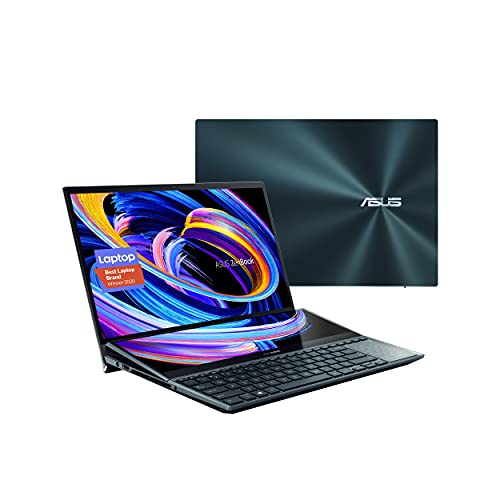
- Best for: Video editors and multitaskers who will genuinely use a second screen for timelines, palettes and references.
- Brand: ASUS
- Model: ZenBook Pro Duo 15 OLED UX582 (UX582LR-XS74T)
- Display: 15.6-inch OLED 4K UHD Touch display
- Secondary display: ScreenPad Plus touchscreen

- Best for: Buyers who want the newest processor and graphics generation in this group and are comfortable buying renewed.
- Brand: Dell
- Model: XPS 15 9510
- Display: 15.6-inch 4K touchscreen per the listing title
- Processor: Intel Core i7, 11th generation, eight cores
All 4 Picks at a Glance
| Product | Specs | Action |
|---|---|---|
| Dell XPS 15 7590 |
| Check price on Amazon |
| ASUS ZenBook Pro Duo UX582 |
| Check price on Amazon |
| Dell XPS 15 9510 (Renewed) |
| Check price on Amazon |
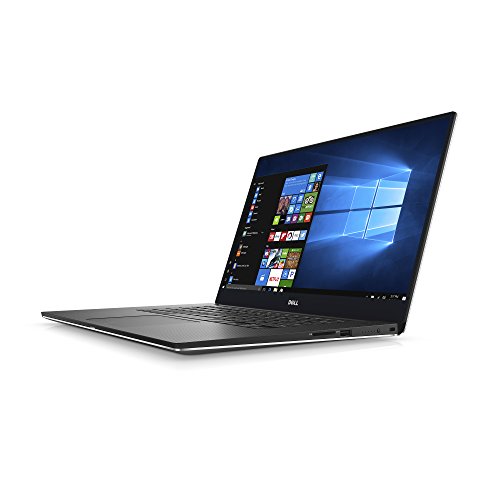 Dell XPS 15 9560 |
| Check price on Amazon |
Key takeaways
- Compare 15.6-inch 4K laptops from Dell and ASUS by panel type, graphics, memory and condition, with buying-timing guidance and verified specs and ASINs.
The real decision with a 15.6-inch 4K laptop is not whether the screen is sharp; at this size, every panel here resolves detail far beyond a Full HD display. The decision is what you give up for that sharpness: battery endurance, weight, or graphics headroom, and whether the specific configuration in front of you pairs the 4K panel with enough memory and storage to stay useful once your photo library, video projects and applications settle onto it.
This guide is for photographers and video editors who want a true 4K panel for detailed work, for professionals who read dense documents and spreadsheets all day, and for sale-season shoppers who would rather shortlist the right models first and watch for the right moment to buy. Each laptop below is a 15.6-inch model whose Amazon listing states a 4K display, and the specs come from those listings.
Quick Picks
As an Amazon Associate we earn from qualifying purchases.
| Product | Best for | Key spec from title |
|---|---|---|
| Dell XPS 15 7590 | A balanced 4K OLED creator laptop | 15.6-inch 4K UHD OLED, Core i7, GTX 1650 |
| ASUS ZenBook Pro Duo UX582 | Dual-screen multitasking for creators | 15.6-inch OLED 4K UHD Touch, RTX 3070, ScreenPad Plus |
| Dell XPS 15 9510 (Renewed) | Newer processor and graphics in a renewed unit | 15.6-inch, Core i7, RTX 3050 Ti, 4K touchscreen |
| Dell XPS 15 9560 | A large-storage 4K configuration from an earlier generation | 15.6-inch 4K Touch, Core i7, 1 TB SSD |
How to Choose
Confirm the panel is genuinely 4K, and note the panel type
Listings use several labels for high-resolution screens, and they are not interchangeable. A true 4K UHD panel in this group resolves 3840 by 2160, while some newer machines use a slightly different tall resolution that sellers still group with 4K-class displays. OLED panels, fitted to three of these four laptops, deliver deep contrast that suits photo and video work, while the touchscreen on the XPS 15 9560 suits annotation and presentation use. Read the resolution line in the listing itself, because the model family name alone does not tell you which panel a given configuration carries.
Pair the screen with enough graphics, memory and storage
A 4K display asks more of the graphics hardware than a Full HD one, especially when you edit video or drive an external monitor as well. Dedicated graphics, such as the GTX and RTX cards in these listings, matter for creators, while memory and storage decide how the machine ages: 16 GB of memory is the sensible floor for editing work, and video projects consume drive space quickly, so a small solid-state drive fills sooner than buyers expect. Check all three figures on the exact configuration, because the same model name is sold with different internals.
Use sale timing as a strategy, not a gamble
For models like these, the sensible approach is to decide your shortlist and your minimum acceptable configuration first, then watch those exact listings through the major shopping periods of the year, when laptop lineups turn over and sellers clear earlier configurations. New model announcements also change the picture, because an outgoing generation often becomes the value pick once its successor appears. What you should not do is relax your specification floor in the excitement of a sale event: a cheaper configuration with too little storage is still the wrong laptop the month after you buy it.
Treat condition as part of the specification
Two routes lead to a 4K laptop at a gentler budget: an earlier generation sold as new old stock, or a newer machine sold as renewed. The renewed XPS 15 9510 in this guide is the clearest example, offering a later processor and graphics generation than the new-condition models here. Renewed can be a sound route, but the condition wording, the included accessories and the return terms belong to the individual listing, so read them with the same care you give the processor line before you commit.
The 4 Best Options
Dell XPS 15 7590
- Best for: Creators who want a genuine 4K OLED screen and dedicated graphics in a slim, desk-and-travel chassis.
- Brand: Dell
- Model: XPS 15 7590 (XPS7590-7572SLV-PUS)
- Display: 15.6-inch 4K UHD OLED InfinityEdge, 3840 x 2160
- Processor: 9th Gen Intel Core i7-9750H
Creators who want a genuine 4K OLED screen and dedicated graphics in a slim, desk-and-travel chassis.
The 256 GB drive is small for video work, so plan external or cloud storage from the start.
The XPS 15 7590 is the balanced pick of this group: a 4K UHD OLED InfinityEdge panel, a six-core-class Core i7 processor of its generation and dedicated GTX graphics in a slim aluminium chassis. It suits creators who want one machine for editing, writing and presenting without moving to a bulky workstation. The configuration listed here carries 16 GB of memory, which fits editing work well, while its solid-state drive is the modest part of the specification and rewards buyers who keep project archives on external storage.
ASUS ZenBook Pro Duo UX582
- Best for: Video editors and multitaskers who will genuinely use a second screen for timelines, palettes and references.
- Brand: ASUS
- Model: ZenBook Pro Duo 15 OLED UX582 (UX582LR-XS74T)
- Display: 15.6-inch OLED 4K UHD Touch display
- Secondary display: ScreenPad Plus touchscreen
Video editors and multitaskers who will genuinely use a second screen for timelines, palettes and references.
It is heavier and more complex than a single-screen laptop, and availability of this configuration fluctuates, so confirm stock on the listing.
The ZenBook Pro Duo is the specialist here, built around a second touchscreen, the ScreenPad Plus, that sits above the keyboard and holds timelines, tool panels or reference material while the main 4K OLED panel carries the work itself. Its listed configuration is also the strongest in this group, with RTX graphics, a large drive and Windows Pro. The trade-offs are weight and complexity: this is a desk-centred creator machine rather than a light travel companion, and the second screen rewards software habits that actually use it.
Dell XPS 15 9510 (Renewed)
- Best for: Buyers who want the newest processor and graphics generation in this group and are comfortable buying renewed.
- Brand: Dell
- Model: XPS 15 9510
- Display: 15.6-inch 4K touchscreen per the listing title
- Processor: Intel Core i7, 11th generation, eight cores
Buyers who want the newest processor and graphics generation in this group and are comfortable buying renewed.
Read the listing’s display fields and condition terms closely, since its title and specification table describe the panel in different terms.
This renewed XPS 15 9510 is the route to a newer platform in this group: an 11th-generation eight-core Core i7 and RTX 3050 Ti graphics behind a 4K touchscreen, with a mid-sized drive that suits a working set of projects. Because it is a renewed listing, the condition is part of the specification, and the listing’s own wording about its display deserves a careful read: the title describes a 4K touchscreen while some specification fields express the panel resolution differently, so verify the panel details on the page before ordering.
Dell XPS 15 9560
- Best for: Buyers who prioritise screen resolution and storage space for documents, photos and lighter creative work.
- Brand: Dell
- Model: XPS 15 9560 (XPS9560-7369SLV-PUS)
- Display: 15.6-inch 4K touch display
- Processor: Intel Core i7-7700HQ
Buyers who prioritise screen resolution and storage space for documents, photos and lighter creative work.
The platform is several generations old, so confirm the operating system and battery condition details on the listing before buying.
The XPS 15 9560 is the earlier-generation option, and its appeal is the combination of a 4K touch display with the largest drive in this group. Its Core i7 processor and GTX graphics belong to an older platform, so it suits buyers whose work is documents, browsing, photo organisation and lighter editing rather than demanding current video workloads. As with any older configuration, the sensible checks are battery expectations, the installed operating system support, and whether the seller’s listing describes the unit’s condition clearly.
Which One Fits Your Situation
You edit photos and video as your main work
Start with the ZenBook Pro Duo if your editing software benefits from a second screen for timelines and tools, and choose the XPS 15 7590 if you prefer a conventional layout with a 4K OLED panel. Both pair the display with dedicated graphics and 16 GB of memory, which is the combination that keeps a 4K workflow comfortable once projects grow beyond a few clips or a small photo set.
You want the newest hardware your budget reaches
Look at the renewed XPS 15 9510. Its processor and graphics are a generation ahead of the other Dell models here, and renewed listings are how that step up becomes reachable in this segment. The discipline is to read the listing like a contract: condition, panel description, included charger and return terms all sit on that page, and they matter as much as the chip names.
You mostly read, write and present, with light editing
The XPS 15 9560 fits, provided you accept its age. A 4K touch panel makes text and slides crisp, and the large drive holds years of documents and photographs. It is the wrong pick for heavy current video work, but for a screen-first machine used at a desk, its specification still reads sensibly against the lighter tasks it will actually face.
You are shopping around a sale period
Decide between the XPS 15 7590 and the ZenBook Pro Duo before the event starts, write down the minimum memory and storage you will accept, and then watch those exact configurations. Sale periods move older and renewed configurations fastest, which is precisely this group’s territory, so preparation matters more than speed: the buyer who already knows their floor makes a calm decision while stock shifts.
Common Mistakes
- Assuming every configuration of a model family has the 4K panel, when the same name is also sold with lower-resolution screens.
- Chasing a sale-period listing with too little storage, then living with a full drive for the life of the machine.
- Ignoring the condition line on renewed listings and expecting new-unit packaging, accessories and terms.
- Paying for a dual-screen design you will never use, when a simpler laptop with the same main panel would serve better.
- Forgetting that a 4K panel shortens battery endurance compared with the same machine running a Full HD screen, which matters for long travel days.
Frequently Asked Questions
Is a 4K screen worth it on a 15.6-inch laptop?
For detailed work, yes: text stays crisp at close reading distance, photographs show fine detail without constant zooming, and video timelines are easier to judge. The costs are battery endurance and price, and for purely casual browsing the difference over a good Full HD panel is smaller. Buyers in this guide are editors, readers and presenters, which are exactly the uses where the extra resolution earns its place.
When is the sensible time to buy one of these models?
The practical windows are the year’s major shopping periods and the weeks when a successor model is announced, because outgoing configurations and renewed stock move then. The strategy that protects you is deciding your model and minimum specification in advance, then buying the configuration that meets it when you see it listed, rather than improvising around whatever happens to be promoted on the day.
Are renewed 4K laptops a reasonable buy?
They can be, and the renewed XPS 15 9510 here shows why: a newer processor and graphics generation than the new-condition alternatives in the same guide. The safeguards are reading the condition description on the listing, confirming what accessories are included, and checking the return terms before ordering. Treat those listing details as part of the specification, not as fine print to skip.
How much storage do I need with a 4K laptop?
More than most buyers first assume. System files and applications take a fixed share, and 4K video footage is bulky, so a small drive that looks adequate in the listing can feel tight within months. If your work involves video, favour the larger-drive configurations here or plan external storage from day one, and keep finished projects archived off the machine as a habit.
FAQ
Is a 4K screen worth it on a 15.6-inch laptop?
When is the sensible time to buy one of these models?
Are renewed 4K laptops a reasonable buy?
How much storage do I need with a 4K laptop?
More from Amazon
Programs that pair well with the guide above. Offers and eligibility are set by Amazon and may change.
Free shipping on eligible items, Prime Video and more. Eligible new members can start with a free trial.
Start a Prime free trialAudiobooks and podcasts to listen to on the go. Eligible new members can start with a free trial.
Try Audible freeAd-free music streaming. Eligible new subscribers can start with a free trial.
Try Music Unlimited freeA free business account with business pricing and bulk-buying tools for work, shop or home office.
Create a business accountAs an Amazon Associate we earn from qualifying purchases.