Our Top Picks
 TP-Link Deco XE75 AXE5400 Tri-Band WiFi 6E System3 Pack4.13 x 4.13 x 6.65 inches3.5 poundsCheck on Amazon
- Top Pick: Conclusion
- Runner-up: Conclusion
- Also consider: Conclusion
If your home WiFi drops out in the back bedroom, the hallway, or the home office, a mesh system is usually the cleanest fix: several matching nodes spread one network across the whole house, and your phone or laptop moves between them without dropping the connection. The five systems below are the mesh kits most worth checking on Amazon right now, spanning a budget WiFi 6 starter set, two mid-range Wi-Fi 6E options, and two premium picks for larger or busier homes. Because offers on networking gear change often, check the product page for current offers before ordering, and use the specs here to confirm that a kit matches your home size, internet plan, and device count.
As an Amazon Associate, we earn from qualifying purchases.
Table of Contents
- TP-Link Deco X55 (3-Pack)
- TP-Link Deco XE75 (3-Pack)
- Google Nest Wifi Pro (3-Pack)
- Amazon eero Pro 6E (3-Pack)
- NETGEAR Orbi RBK753 (3-Pack)
- How to Choose a Mesh WiFi System
- Frequently Asked Questions
- Conclusion
- Product and ASIN Reference
TP-Link Deco X55 (3-Pack)
The Deco X55 is the budget-friendly way into mesh networking, and it covers a surprising amount of space for an entry-level kit. The three-pack is rated to cover up to 6,500 square feet and connect up to 150 devices, which is plenty for most family homes with a mix of phones, laptops, TVs, and smart home gear. It runs dual-band WiFi 6 with an AX3000 speed rating, split between 2,402 Mbps on the 5 GHz band and 574 Mbps on the 2.4 GHz band, and it supports 160 MHz channels on 5 GHz for faster links to newer laptops and phones.
Each unit has three Gigabit Ethernet ports, so there are enough wired connections for a TV, a game console, or a desktop near any node. The X55 also supports Ethernet backhaul, which means the nodes can talk to each other over a wired connection if your home has network cabling, freeing the wireless bands for your devices. TP-Link HomeShield adds basic network security scanning and parental controls, and setup runs through the Deco app. For shoppers whose internet plan is at or below gigabit speed and who simply want dead zones gone, this is the kit to check first, and it is worth a look on the product page for current offers during seasonal sales events.
Specs
- WiFi standard: WiFi 6 (802.11ax), dual-band
- Speed rating: AX3000 (2,402 Mbps on 5 GHz, 574 Mbps on 2.4 GHz)
- Coverage: up to 6,500 sq. ft. (3-pack)
- Device capacity: up to 150 devices
- Ethernet: 3 Gigabit ports per unit
- Backhaul: wireless or wired Ethernet backhaul
- Extras: OFDMA, MU-MIMO, HomeShield, Alexa compatible
TP-Link Deco XE75 (3-Pack)
The Deco XE75 steps up to Wi-Fi 6E, adding the 6 GHz band on top of the usual 5 GHz and 2.4 GHz radios. That extra band gives Wi-Fi 6E laptops, phones, and tablets a less crowded lane, and it can also serve as a cleaner wireless link between nodes. The three-pack is rated for up to 7,200 square feet and up to 200 connected devices, with an AXE5400 speed rating of 2,402 Mbps on 6 GHz, 2,402 Mbps on 5 GHz, and 574 Mbps on 2.4 GHz.
Like the X55, each XE75 unit carries three Gigabit Ethernet ports and supports wired backhaul, and the system uses AI-Driven Mesh to learn the layout of the home and adjust routing between nodes. HomeShield Pro features are available for households that want more advanced security and parental control tools. The main reason to pick the XE75 over the X55 is the 6 GHz band: if you already own Wi-Fi 6E devices, or plan to keep the system through your next phone and laptop upgrade, the extra band gives the network more headroom. Check the product page for current offers, since this kit is a frequent feature in Amazon networking promotions.
Specs
- WiFi standard: Wi-Fi 6E (802.11ax), tri-band
- Speed rating: AXE5400 (2,402 Mbps on 6 GHz, 2,402 Mbps on 5 GHz, 574 Mbps on 2.4 GHz)
- Coverage: up to 7,200 sq. ft. (3-pack)
- Device capacity: up to 200 devices
- Ethernet: 3 Gigabit ports per unit
- Backhaul: wireless or wired Ethernet backhaul
- Extras: AI-Driven Mesh, HomeShield Pro available, Alexa compatible
Google Nest Wifi Pro (3-Pack)
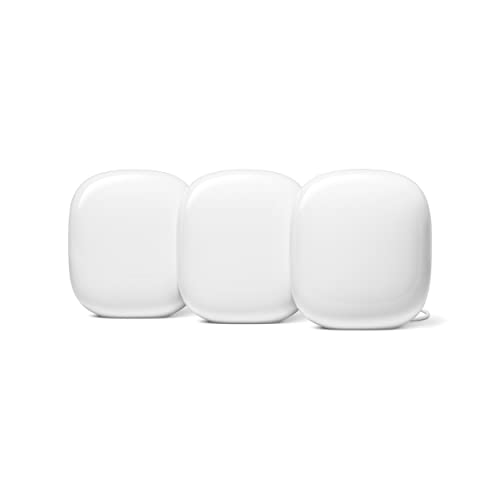
Google’s Nest Wifi Pro takes a different approach: simple hardware, automatic network management, and tight integration with the Google Home app. Each router covers up to 2,200 square feet, so the three-pack reaches up to 6,600 square feet, and the system is built on tri-band Wi-Fi 6E with an AXE5400 rating. It handles the behind-the-scenes work itself, with automatic network optimization and self-diagnosis that can flag connection problems before you notice them.
Every Nest Wifi Pro unit doubles as a smart home hub, with Matter support and a built-in Thread border router, which makes it a tidy pick for homes that run Google Assistant speakers and displays. Each router has two Ethernet ports, one for the modem connection and one for a wired device, both at gigabit speed. One important note: Nest Wifi Pro is not compatible with older Google Wifi or original Nest Wifi points, so it is a fresh start rather than an expansion of an older setup. For households that want the network to manage itself and prefer Google’s app and ecosystem, this three-pack is the one to watch, and checking the product page for current offers is worthwhile because Google hardware features regularly in seasonal promotions.
Specs
- WiFi standard: Wi-Fi 6E (802.11ax), tri-band
- Speed rating: AXE5400
- Coverage: up to 2,200 sq. ft. per router, up to 6,600 sq. ft. (3-pack)
- Ethernet: 2 Gigabit ports per router (1 WAN, 1 LAN)
- Smart home: Matter support, built-in Thread border router
- Management: Google Home app, automatic optimization, self-diagnosis
- Note: not compatible with previous Google Wifi or Nest Wifi generations
Amazon eero Pro 6E (3-Pack)
The eero Pro 6E is built for homes with fast internet plans and a lot of connected gear. The three-pack covers up to 6,000 square feet and supports more than 100 connected devices, and each unit pairs one auto-sensing 2.5 GbE Ethernet port with one Gigabit port, so the main unit can take full advantage of multi-gig internet plans when wired. Eero rates the system for network speeds up to 2.3 Gbps across wired and wireless connections, and the tri-band Wi-Fi 6E radios include 160 MHz channel support on the 5 GHz and 6 GHz bands.
Eero’s TrueMesh software manages roaming and channel selection automatically, and each unit includes a built-in Zigbee smart home hub plus Thread support, which suits Alexa-centered homes. Advanced security, ad blocking, and parental controls sit behind the optional eero Plus subscription, so factor that in if those features matter to you. Setup is app-guided and among the simplest in this group. Because eero hardware is Amazon’s own line, it appears in Amazon sales events often, so check the product page for current offers before buying.
Specs
- WiFi standard: Wi-Fi 6E (802.11ax), tri-band
- Speed rating: AXE5400 class, network speeds up to 2.3 Gbps
- Coverage: up to 6,000 sq. ft. (3-pack)
- Device capacity: 100+ devices
- Ethernet: 1 auto-sensing 2.5 GbE port and 1 Gigabit port per unit
- Smart home: built-in Zigbee hub, Thread support
- Extras: TrueMesh software, optional eero Plus subscription for advanced features
NETGEAR Orbi RBK753 (3-Pack)
The Orbi RBK753 is the pick for larger homes that want strong coverage without moving to Wi-Fi 6E pricing tiers. The router and two satellites cover up to 7,500 square feet, the most of any kit in this roundup, and the tri-band WiFi 6 design reserves its fastest 5 GHz band (2,400 Mbps) as a dedicated backhaul link between the router and satellites. That dedicated lane keeps the two bands your devices use (1,200 Mbps on 5 GHz and 600 Mbps on 2.4 GHz) free for traffic, which helps in busy homes with simultaneous streaming, gaming, and video calls.
The router provides one WAN and three LAN Gigabit ports, and each satellite adds two more LAN ports, so wired devices like consoles, TVs, and desktop PCs can plug in at several spots around the house. NETGEAR Armor security is available for households that want network-level protection for every connected device. The AX4200 rating and 40-plus device capacity suit families on cable or fiber plans up to gigabit speed. Orbi kits show up in Amazon deals rotations throughout the year, so it is worth checking the product page for current offers before ordering.
Specs
- WiFi standard: WiFi 6 (802.11ax), tri-band
- Speed rating: AX4200 (600 Mbps on 2.4 GHz, 1,200 Mbps on 5 GHz, 2,400 Mbps dedicated backhaul)
- Coverage: up to 7,500 sq. ft. (3-pack)
- Device capacity: 40+ devices
- Ethernet: router 1 WAN and 3 LAN Gigabit ports, 2 LAN Gigabit ports per satellite
- Backhaul: dedicated tri-band wireless backhaul
- Extras: NETGEAR Armor available, Alexa compatible
How to Choose a Mesh WiFi System
Start with coverage. Match the rated coverage of the kit to your home with some margin, because walls, floors, and building materials shrink real-world reach; a three-pack is the standard choice for multi-story homes. Next, look at your internet plan. A dual-band WiFi 6 kit like the Deco X55 is a sensible match for plans up to gigabit speed, while Wi-Fi 6E systems such as the Deco XE75, Nest Wifi Pro, and eero Pro 6E add the 6 GHz band for newer devices and more headroom. If your plan is faster than gigabit, check the port speeds: the eero Pro 6E includes a 2.5 GbE port, while the other kits here top out at gigabit Ethernet.
Then count wired connections. Households with consoles, TVs, or desktops near several rooms should note the port counts per node, where the Orbi and the two Deco kits are generous. Finally, consider the app and extras: Google Home households may prefer Nest Wifi Pro, Alexa homes may lean toward eero, and shoppers who want security features should check which tools are included and which need a subscription. Whatever you choose, check the product page for current offers, since mesh systems are discounted on a rotating basis and the same kit can appear in several events a year.
Frequently Asked Questions
Will a mesh system work with my existing internet provider?
Yes. Every kit in this roundup connects to the modem or gateway from your internet provider with an Ethernet cable and then broadcasts its own network, so it works with cable, fiber, and DSL services alike. Most providers’ gateways can be left as they are or switched to bridge mode, and each system’s app walks through the connection steps.
How many nodes does my home actually need?
A single node suits a small apartment, a two-pack fits most single-story homes, and a three-pack is the safer choice for multi-story houses or homes with thick walls. All five systems here are three-packs, and extra nodes can usually be added later within the same product family if a dead zone remains.
Is Wi-Fi 6E worth choosing over WiFi 6?
Wi-Fi 6E adds the 6 GHz band, which is less crowded and supports fast, low-latency links for devices that support it, such as recent phones, laptops, and tablets. If most of your devices are older, a WiFi 6 kit like the Deco X55 or Orbi RBK753 covers the basics well; if you are upgrading devices over the next few years, a 6E system like the Deco XE75 or eero Pro 6E gives the network more room to grow.
Can I connect devices with Ethernet cables to a mesh system?
Yes. Each node has Ethernet ports, and the count varies by model: the Deco X55 and XE75 provide three Gigabit ports per unit, the Orbi router and satellites provide several ports as well, and the Nest Wifi Pro and eero Pro 6E provide two ports per unit. Wired connections are a good choice for stationary gear like TVs, consoles, and desktop computers.
Conclusion
For most shoppers, the TP-Link Deco XE75 hits the balance point in this group: Wi-Fi 6E, wide coverage, and plenty of Ethernet ports. The Deco X55 is the budget entry point for smaller plans and homes, the Nest Wifi Pro suits Google Home households that want the network to manage itself, the eero Pro 6E fits Alexa homes with multi-gig internet, and the Orbi RBK753 covers the largest floor plans with its dedicated backhaul band. Mesh pricing moves with each sales event, so check the product page for current offers on the kit that matches your home, and confirm the coverage rating and port speeds against your setup before ordering.



FAQ
Will a mesh system work with my existing internet provider?
How many nodes does my home actually need?
Is Wi-Fi 6E worth choosing over WiFi 6?
Can I connect devices with Ethernet cables to a mesh system?
More from Amazon
Programs that pair well with the guide above. Offers and eligibility are set by Amazon and may change.
Free shipping on eligible items, Prime Video and more. Eligible new members can start with a free trial.
Start a Prime free trialAudiobooks and podcasts to listen to on the go. Eligible new members can start with a free trial.
Try Audible freeAd-free music streaming. Eligible new subscribers can start with a free trial.
Try Music Unlimited freeA free business account with business pricing and bulk-buying tools for work, shop or home office.
Create a business accountAs an Amazon Associate we earn from qualifying purchases.