Key takeaways
- Compare the best mini PC deals worth checking now, from a budget GMKtec desktop to the Mac mini M4, with CPU, memory, storage, and port specs.
- Top Pick: GMKtec NucBox G3 Pro Mini PC
- Runner-up: Beelink SER8 Mini PC
- Also consider: GMKtec NucBox K8 Plus Mini PC
If you want the short answer, the best mini PC deals right now cluster around five machines: the GMKtec NucBox G3 Pro for basic office work on a budget, the Beelink SER8 as a quiet mid-range all-rounder, the GMKtec NucBox K8 Plus for buyers who want an OCuLink port and room to grow, the ASUS NUC 14 Pro+ for a premium Intel build with Thunderbolt 4, and the Apple Mac mini with M4 for macOS in the smallest footprint here. Each one is a complete desktop that mounts behind a monitor or disappears under one, and each one regularly appears with offers worth checking on its product page. This guide groups the five into budget, mid-range, and premium tiers, explains the specs that actually matter, and shows you how to match a mini PC to the work you do before you spend anything.
As an Amazon Associate, we earn from qualifying purchases.
Table of Contents
- How to Choose the Right Mini PC Deal
- GMKtec NucBox G3 Pro Mini PC
- Beelink SER8 Mini PC
- GMKtec NucBox K8 Plus Mini PC
- ASUS NUC 14 Pro+ Mini PC
- Apple Mac mini with M4
- Frequently Asked Questions
- Conclusion
How to Choose the Right Mini PC Deal
Start with the processor, because it decides what the machine feels like three years from now. Mini PCs fall into three broad chip classes. Low-power Intel N-series and older Core i3 chips handle browsing, documents, video playback, and light office work without breaking a sweat, and they sip power while doing it. Mainstream AMD Ryzen 7 and Intel Core Ultra chips are a different league, with eight or more threads for heavier multitasking, photo editing, and light gaming on integrated graphics. Apple silicon sits in its own category, pairing strong performance with very low power draw, but it ties you to macOS and fixed configurations.
Memory and storage come next. Sixteen gigabytes of RAM is the comfortable floor for a Windows machine you plan to keep, and 512 gigabytes of SSD storage fills faster than most buyers expect once photos, games, and work files pile up. Check whether the machine lets you upgrade. Models with SO-DIMM slots and a standard M.2 slot can take more memory and a bigger drive later, which stretches the value of the original purchase. Soldered configurations, like the Mac mini, force you to choose correctly on day one.
Ports decide how the mini PC fits your desk. Dual HDMI is enough for a simple two-monitor office setup. USB4 and Thunderbolt 4 add fast external drives, single-cable docks, and high-refresh 4K displays. An OCuLink port, found on the K8 Plus below, is the one to look for if you ever plan to connect an external graphics card. A 2.5 gigabit Ethernet port is worth having for a home server or NAS role, and WiFi 6 or 6E covers everyone else.
Finally, think about noise and support. A mini PC usually sits within arm’s reach, so a well-designed cooling system matters more than the last few percent of benchmark performance. Established brands with real warranty terms and firmware updates are the safer deal, because a mini PC is difficult to repair with generic parts. Pick the tier that matches your workload first, then check the product page for the current offer on that model.
GMKtec NucBox G3 Pro Mini PC
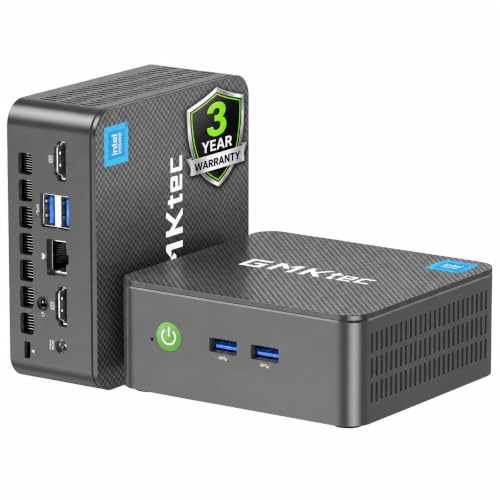
The GMKtec NucBox G3 Pro is the budget pick on this list, built for the jobs a basic desktop actually does all day. Its Intel Core i3-10110U processor has two cores and four threads, which is enough for web browsing, email, documents, video calls, and 4K video playback, and GMKtec pairs it with 8 gigabytes of DDR4 memory and a 256 gigabyte SSD. It is not a machine for heavy multitasking or gaming, and it does not pretend to be.
What makes the G3 Pro a sensible deal is the port selection at this tier. Dual HDMI outputs drive two 4K displays, four USB 3.2 ports handle peripherals and external drives, and the Intel i226-V Ethernet controller gives it a fast wired connection that suits a small office, a point-of-sale counter, a classroom, or a low-power home server. WiFi 6 and Bluetooth 5.2 cover wireless duty, and the included VESA mount lets the whole computer hide behind a monitor.
This is the deal to check first if you need a second PC, a streaming box for the TV, or a simple workstation for a student. The trade-offs are the fixed modest memory and storage, so confirm the configuration on the listing matches the work you have in mind. For straightforward everyday computing, the G3 Pro covers the essentials at the budget tier.
Specs:
- Processor: Intel Core i3-10110U, 2 cores and 4 threads
- Memory: 8GB DDR4 RAM
- Storage: 256GB SSD
- Graphics: Intel UHD Graphics, dual 4K HDMI output
- Networking: Intel i226-V RJ45 Ethernet, WiFi 6, Bluetooth 5.2
- Ports: 4 USB 3.2 ports, 2 HDMI ports
- Extras: VESA mount with screws included
- Tier: budget
Beelink SER8 Mini PC

The Beelink SER8 is the mid-range pick for buyers who want one small machine that does a bit of everything well. Its AMD Ryzen 7 8745HS processor brings eight cores and sixteen threads, paired with 32 gigabytes of DDR5 memory and a 1 terabyte PCIe 4.0 SSD, so it handles heavy browser workloads, office multitasking, photo editing, and development work without the slowdowns that budget boxes show. The integrated Radeon 780M graphics also make light 1080p gaming realistic, which the budget tier cannot offer.
Beelink built its reputation in this class on quiet cooling, and the SER8 is the machine on this list to look at if the PC will live on your desk rather than behind it. Triple display support runs through HDMI, DisplayPort, and a USB4 port, so a two or three monitor setup needs no dock. A 2.5 gigabit LAN port, WiFi 6, and Bluetooth 5.2 round out a connection set that suits a home office or a compact home server equally well.
Check the current offer on the SER8 if your workload has outgrown an entry-level box but a full tower makes no sense. The honest limitation is that integrated graphics still set the ceiling for gaming and GPU-heavy work, and buyers who know they need more graphics power should look at the OCuLink option below instead.
Specs:
- Processor: AMD Ryzen 7 8745HS, 8 cores and 16 threads, up to 4.9GHz
- Memory: 32GB DDR5 RAM
- Storage: 1TB PCIe 4.0 SSD
- Graphics: AMD Radeon 780M integrated graphics
- Displays: triple display via HDMI, DisplayPort, and USB4
- Networking: 2.5G LAN, WiFi 6, Bluetooth 5.2
- Operating system: Windows 11 Pro
- Tier: mid-range
GMKtec NucBox K8 Plus Mini PC
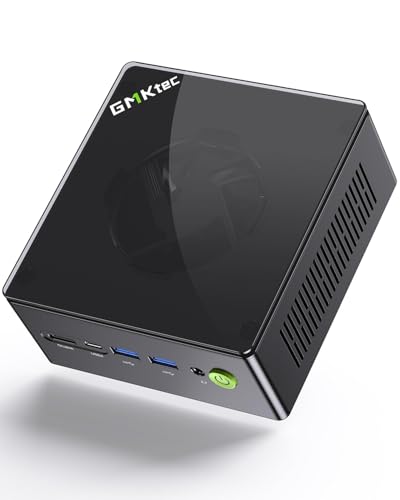
The GMKtec NucBox K8 Plus is the pick for buyers who want a mini PC that can grow into a gaming setup. It runs an AMD Ryzen 7 8845HS with eight cores, sixteen threads, and boost speeds up to 5.1GHz, and this configuration ships with 32 gigabytes of DDR5 memory and a 512 gigabyte PCIe 4.0 SSD. On its own, the Radeon 780M integrated graphics handle everyday work and light gaming; the headline feature is what plugs into the back.
The K8 Plus carries an OCuLink port, which connects an external graphics dock over a direct PCIe link that is faster than tunneling a GPU through USB4. That single port changes the machine’s ceiling: start with the integrated graphics now, and add a desktop graphics card later if your gaming or GPU compute needs grow. Two USB4 ports, HDMI 2.1, and DisplayPort 2.1 drive up to four displays, and dual Intel i226V 2.5 gigabit Ethernet ports make it a natural fit for a home lab, a firewall project, or a small server alongside its desktop role.
Memory and storage are user upgradeable, which protects the value of the purchase better than a sealed box. The trade-off is that an external GPU dock is an extra purchase, so the K8 Plus makes the most sense when you genuinely expect to use the expansion path. If you do, it is usually the smartest deal to watch in this tier.
Specs:
- Processor: AMD Ryzen 7 8845HS, 8 cores and 16 threads, up to 5.1GHz
- Memory: 32GB DDR5 RAM, upgradeable
- Storage: 512GB PCIe 4.0 SSD, upgradeable
- Graphics: AMD Radeon 780M integrated graphics
- Expansion: OCuLink port for an external graphics dock
- Displays: quad display via HDMI 2.1, DisplayPort 2.1, and dual USB4
- Networking: dual Intel i226V 2.5G Ethernet, WiFi 6, Bluetooth 5.2
- Tier: mid-range
ASUS NUC 14 Pro+ Mini PC

The ASUS NUC 14 Pro+ is the premium Intel pick, descended from the original Intel NUC line that ASUS now runs. This full system pairs an Intel Core Ultra 5 125H processor with 16 gigabytes of DDR5 memory and a 512 gigabyte PCIe Gen4 NVMe SSD, and adds the three AI engines Intel builds into the Core Ultra family: CPU, GPU, and a dedicated NPU for on-device AI tasks. The silver aluminum chassis opens without tools, so memory and storage upgrades take minutes rather than a service visit.
Thunderbolt 4 is the connection that defines this tier. It carries fast storage, docking stations, and displays over a single cable standard, which makes the NUC 14 Pro+ an easy fit for a tidy desk that connects to everything through one dock. WiFi 6E and Bluetooth 5.3 handle the wireless side, Windows 11 Home is installed, and the VESA mount in the box lets the machine disappear behind a monitor in an office or a reception area.
Choose the NUC 14 Pro+ when build quality, quiet manners, and painless upgrades matter more than raw gaming power, and when you want a major brand’s warranty behind the purchase. Integrated Intel graphics are fine for productivity and media work, but dedicated gamers should weigh the K8 Plus and its OCuLink path instead. When this model shows an offer on its product page, it is the strongest premium Windows deal here for a long-term office machine.
Specs:
- Processor: Intel Core Ultra 5 125H with built-in NPU
- Memory: 16GB DDR5 RAM
- Storage: 512GB PCIe Gen4 NVMe SSD
- Graphics: Intel integrated graphics
- Ports: Thunderbolt 4, USB, HDMI
- Networking: WiFi 6E, Bluetooth 5.3
- Design: silver aluminum chassis with toolless access, VESA mount included
- Operating system: Windows 11 Home
- Model: RNUC14RVSU5068AUI
- Tier: premium
Apple Mac mini with M4

The Apple Mac mini with M4 is the premium pick for anyone who works in macOS, and the smallest computer on this list at five inches square and two inches tall. Apple’s M4 chip combines a 10-core CPU, a 10-core GPU, and a 16-core Neural Engine built for Apple Intelligence features, and this configuration pairs it with 16 gigabytes of unified memory and a 256 gigabyte SSD. Performance per watt is the headline: it does serious photo, video, and development work while drawing a fraction of the power of a comparable tower.
The port layout improved with this generation. Two USB-C ports and a headphone jack sit on the front, and the back carries three Thunderbolt 4 ports, HDMI, and gigabit Ethernet, so a multi-monitor desk setup needs no awkward adapters. It runs quietly enough to live in a recording space or a bedroom, and it sips power as an always-on home server.
The compromises are fixed and worth stating plainly. Memory and storage cannot be upgraded after purchase, and the 256 gigabyte base drive fills quickly, so many buyers should price the larger storage configuration before deciding which listing to buy. There is no Windows here, which settles the question for software that needs it. For macOS users, though, the Mac mini is the deal to check first in the premium tier, because nothing else this small performs like it.
Specs:
- Processor: Apple M4 chip, 10-core CPU and 10-core GPU
- Neural Engine: 16-core, built for Apple Intelligence
- Memory: 16GB unified memory, not upgradeable
- Storage: 256GB SSD, not upgradeable
- Ports: 3 Thunderbolt 4, 2 front USB-C, HDMI, gigabit Ethernet
- Dimensions: 5 x 5 x 2 inches, 1.5 pounds
- Model: MU9D3LL/A
- Tier: premium
Frequently Asked Questions
How much RAM do I need in a mini PC?
For browsing, documents, and video, 8 gigabytes still works, and the budget pick on this list proves it. For a Windows machine you plan to keep for years, 16 gigabytes is the comfortable minimum, and 32 gigabytes suits heavy multitasking, virtual machines, and development work. Remember that some mini PCs, including the Mac mini, cannot be upgraded later, while models with SO-DIMM slots can take more memory when you need it.
Can a mini PC replace a full desktop tower?
For office work, media, and light creative work, yes. Modern mini PCs match a mid-range tower for everyday tasks, use far less power, and free up desk space. The limits are graphics and expansion: there is no room inside for a full-size graphics card, so serious gaming and GPU rendering call for a tower, or for a mini PC with an OCuLink port and an external graphics dock like the K8 Plus above.
Are mini PC deals better during big sales events?
Mini PCs are a heavily promoted category, so offers appear throughout the year and not only during headline events. The practical approach is to pick the configuration that fits your workload first, because memory and storage variants of the same model carry different offers, then check the product page for the current offer on that exact configuration. A slightly larger SSD or memory configuration on offer is often the better long-term deal than the base model at a headline reduction.
What should I check before buying a mini PC for a home server?
Look for a fast wired connection, ideally 2.5 gigabit Ethernet, low idle power draw, and a processor that supports hardware video transcoding if you plan to stream media. The budget and mid-range picks here all sip power compared with an old tower, and models with USB4 or spare M.2 slots give you room to add storage as your library grows. Confirm the operating system situation on the listing, since some configurations ship without one.
Conclusion
The best mini PC deal is the one that matches your workload, your operating system, and your upgrade expectations. Choose the GMKtec NucBox G3 Pro for basic office and streaming duty on a budget, the Beelink SER8 for a quiet mid-range machine that handles almost everything, the GMKtec NucBox K8 Plus when you want an OCuLink path to real graphics power, the ASUS NUC 14 Pro+ for a premium Intel build with Thunderbolt 4 and easy upgrades, and the Apple Mac mini with M4 for macOS performance in the smallest footprint here. Check the product page of the model that fits your desk for its current offer, confirm the memory and storage configuration matches the listing described above, and you will end up with a desktop that takes up almost no space at all.
FAQ
How much RAM do I need in a mini PC?
Can a mini PC replace a full desktop tower?
Are mini PC deals better during big sales events?
What should I check before buying a mini PC for a home server?
More from Amazon
Programs that pair well with the guide above. Offers and eligibility are set by Amazon and may change.
Free shipping on eligible items, Prime Video and more. Eligible new members can start with a free trial.
Start a Prime free trialAudiobooks and podcasts to listen to on the go. Eligible new members can start with a free trial.
Try Audible freeAd-free music streaming. Eligible new subscribers can start with a free trial.
Try Music Unlimited freeA free business account with business pricing and bulk-buying tools for work, shop or home office.
Create a business accountAs an Amazon Associate we earn from qualifying purchases.