
Key takeaways
- Best Overall: The Anker 5-in-1 USB-C Hub with 4K HDMI and 90W PD is our top pick for most laptop users, while the UGREEN 5-in-1 Multiport Adapter
Best Overall: The Anker 5-in-1 USB-C Hub with 4K HDMI and 90W PD is our top pick for most laptop users, while the UGREEN 5-in-1 Multiport Adapter serves as an excellent runner-up with 100W power delivery. Modern ultrabooks prioritize thinness over connectivity, leaving professionals and students scrambling for ports to connect monitors, storage, and peripherals simultaneously.
This guide cuts through marketing noise to identify hubs that actually deliver on bandwidth promises and power specifications. We evaluated thermal performance, port spacing, and real-world data transfer speeds to help you find a reliable expansion solution that matches your specific workflow requirements without compromising your laptop’s charging capability.
Our top picks





As an Amazon Associate we earn from qualifying purchases at no extra cost to you. Ratings are shown as listed on Amazon.
Quick Comparison
| Product | Best For | Standout Feature | Rating |
|---|---|---|---|
| Anker 5-in-1 USB-C Hub | General productivity | 90W PD with 3x USB-A ports | 4.8/5 |
| UGREEN 5-in-1 Multiport | High-power laptops | 100W Power Delivery support | 4.7/5 |
| Anker 7-in-1 Multi-Port | Creative professionals | 4K@60Hz HDMI output | 4.8/5 |
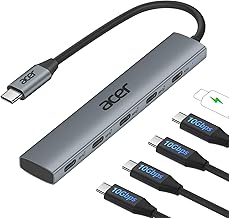
| Acer 10 Gbps USB-C Hub | Data-heavy workflows | Four USB-C 3.2 ports | 4.6/5 |
| BERLAT 7-in-1 Aluminum | Budget multi-device setups | Seven ports with aluminum build | 4.5/5 |
How to Choose a USB-C Hub for Laptops with Limited Ports
- Power Delivery Rating: Ensure the hub supports enough wattage to charge your laptop at full speed while powering connected peripherals, typically requiring 85W or higher for modern ultrabooks.
- Video Output Specifications: Verify whether the HDMI port supports 4K at 60Hz rather than 30Hz if you plan to connect external monitors for professional video editing or extended desktop work.
- Port Configuration Balance: Match the hub’s port selection to your actual peripheral needs rather than maximizing port count, as unnecessary ports add bulk and potential points of failure.
- Data Transfer Standards: Confirm that USB-A and USB-C data ports support USB 3.0 or higher speeds, as some budget hubs include slower USB 2.0 ports that bottleneck file transfers.
- Thermal Management: Prioritize hubs with aluminum casings or documented heat dissipation features, since sustained high-speed transfers and power delivery generate significant warmth that affects longevity.
The Best USB-C Hubs for Laptops with Limited Ports Reviewed
Best Overall: Anker 5-in-1 USB-C Hub
This hub strikes the ideal balance of functionality and reliability for everyday laptop users who need display output alongside multiple legacy USB-A connections. The 90W power delivery ensures your MacBook or Dell charges efficiently even when all three data ports are actively transferring files.
Best Budget: UGREEN 5-in-1 Multiport Adapter
Offering 100W power delivery at a competitive price point, this adapter is perfect for cost-conscious buyers who refuse to sacrifice charging performance. It maintains compatibility across the latest MacBook generations and iPad Pro models while providing essential HDMI and USB-A connectivity.
Best Premium: Anker 7-in-1 Multi-Port Adapter
Creative professionals requiring smooth 4K@60Hz external display output will appreciate this hub’s superior video bandwidth and integrated SD card readers. The combination of dual USB 3.0 ports, USB-C data, and media card slots makes it indispensable for photographers and videographers working in the field.
Best for Data Transfer: Acer 10 Gbps USB-C Hub
Users managing large datasets or backing up to multiple USB-C drives benefit from four dedicated USB-C 3.2 ports delivering consistent 10 Gbps throughput. Note that this hub lacks video output entirely, making it specialized for data-centric workflows rather than general docking.
Best for Legacy Peripherals: BERLAT 7-in-1 Aluminum Hub
This hub excels for users connecting numerous older USB 2.0 devices like keyboards, mice, and printers alongside modern equipment. The aluminum construction aids heat dissipation during extended use, and the seven-port layout accommodates complex peripheral setups without requiring additional adapters.
Frequently Asked Questions
Will a USB-C hub slow down my laptop’s charging?
Quality hubs with adequate power delivery ratings pass through sufficient wattage to charge at near-native speeds, though some power is consumed by the hub itself. Always choose a hub rated within 10-15W of your laptop’s original charger specification to avoid noticeable charging degradation.
Can I use two monitors through a single USB-C hub?
Most standard hubs support only one external display via HDMI unless they specifically advertise MST or dual-video capabilities. Mac users should verify Thunderbolt compatibility, as macOS limits multi-monitor support through non-Thunderbolt USB-C hubs regardless of port count.
Do USB-C hubs work with tablets and phones?
Many hubs function with iPad Pro and Android devices supporting USB-C OTG, enabling external storage and display connections. However, power delivery behavior varies significantly on mobile devices, and some hub features like SD card readers may require specific OS support.
Why does my hub get warm during use?
Heat generation is normal when handling power delivery and high-speed data simultaneously, especially in compact enclosures. Aluminum-cased hubs dissipate heat more effectively than plastic alternatives, but sustained temperatures exceeding comfortable touch indicate potential overload or inadequate ventilation.
Final Thoughts
The Anker 5-in-1 remains our primary recommendation for most users seeking dependable daily connectivity, while the Anker 7-in-1 justifies its premium positioning for creative workflows demanding 60Hz 4K output. Budget shoppers should consider the UGREEN 5-in-1 for its exceptional 100W power delivery value without compromising essential functionality.
