Key takeaways
- Compare five receipt scanners for home and small business budgets, from USB mobile models to fast wireless duplex machines with receipt software.
- Top Pick: Recommended product
- Runner-up: Recommended product
- Also consider: Final Verdict
Paper receipts fade, crumple, and pile up in drawers, glove boxes, and shoeboxes, usually right up until tax season or an expense deadline makes them urgent. A dedicated receipt scanner solves that problem at the source: instead of photographing slips one at a time, you feed them through a scanner built to read narrow, flimsy paper, and the bundled software pulls out the vendor, date, and total so the record is searchable later. For households tracking deductible expenses and for small businesses that cannot afford bookkeeping chaos, that is a practical upgrade rather than a luxury gadget.
The five scanners below cover the realistic budget range for this category. Two are full desktop machines with large feeders for clearing a year of paperwork in one sitting, one is a general office scanner that handles receipts alongside regular documents, and two are small USB-powered models for people who scan a handful of receipts at a time. None of them requires a subscription just to manage receipts, which matters if the goal is saving money rather than adding another monthly bill.
As an Amazon Associate, we earn from qualifying purchases.
Quick Answer
If receipts pile up at tax time, a dedicated receipt scanner is the fastest fix. Desktop duplex models like the Epson RapidReceipt RR-600W and RR-620W clear stacks quickly and extract expense data, the Canon imageFORMULA R40 suits mixed office documents, and the Epson RR-60 and Brother DS-640 cover light, mobile scanning on a budget.
Epson RapidReceipt RR-600W
The RR-600W is Epson’s flagship receipt scanner and the natural starting point for anyone with a serious backlog. Its 100-page auto document feeder means a year of receipts, invoices, and statements can be loaded in batches instead of fed one slip at a time, and it scans both sides of each page in a single pass at up to 35 pages per minute. The touchscreen lets you pick scan destinations at the machine, and Wi-Fi connectivity means it does not need to sit next to your computer.
The bundled ScanSmart software is the real reason to pick a RapidReceipt model over a generic scanner: it is designed to extract and categorize key data from receipts and invoices, then organize the results into searchable digital records for PC or Mac. If your end goal is tidy expense records rather than a folder of image files, this is the most complete package in this guide.
Specs
- Scanner type: Desktop document and receipt scanner
- Connectivity: Wi-Fi, with USB connection also listed
- Resolution: 600 dpi
- Feeder capacity: 100-page auto document feeder
- Scan speed: Up to 35 pages per minute, two-sided scanning in one pass
- Display: Touchscreen
- Software: Epson ScanSmart with receipt data extraction
- Compatibility: PC and Mac
- Power: 13 watts per the listing
Epson RapidReceipt RR-620W
The RR-620W is the faster step up in the same RapidReceipt family. It keeps the 100-page auto document feeder and adds a higher rated speed of up to 45 pages per minute, or 90 images per minute when both sides are counted, which makes a visible difference when the scanning pile is measured in hundreds of pages rather than dozens. A 4.3-inch color touchscreen handles setup and destination shortcuts at the device itself.
Like the RR-600W, it runs Epson’s ScanSmart AI PRO software, which extracts receipt and invoice data and converts scans into searchable, editable files for use with accounting workflows. Choose this model over the RR-600W if your volume is high and steady, for example a small business scanning daily receipts and supplier invoices, where the extra speed pays for itself in saved time across a year.
Specs
- Scanner type: Desktop receipt and document scanner
- Connectivity: Wi-Fi and USB
- Resolution: 600 dpi
- Feeder capacity: 100-page auto document feeder
- Scan speed: Up to 45 pages per minute, 90 images per minute two-sided
- Display: 4.3-inch color touchscreen
- Software: Epson ScanSmart AI PRO data management software
- Compatibility: Mac and PC
Canon imageFORMULA R40
The Canon imageFORMULA R40 takes a different approach: it is a general office document scanner that also handles receipts well, which suits households and offices whose scanning is a mix of contracts, statements, business cards, photos, and expense slips. Its feeder holds up to 60 sheets, and it scans both sides in color, rated at up to 40 pages per minute for black-and-white and 30 pages per minute for color work.
Canon’s bundled CaptureOnTouch software converts paper into searchable digital files, and the scanner works with both Windows and Mac computers over a USB connection. There is no Wi-Fi here, so it belongs on the desk next to the computer that does the scanning. Pick the R40 if receipts are only part of your paper problem and you want one machine for the whole filing cabinet.
Specs
- Scanner type: Office document scanner; media types include receipts, business cards, paper, and photos
- Connectivity: USB
- Feeder capacity: 60-sheet auto document feeder
- Scan speed: Up to 40 pages per minute black-and-white, 30 pages per minute color
- Resolution: 600 dpi optical
- Software: Canon CaptureOnTouch bundled software
- Compatibility: Windows and Mac
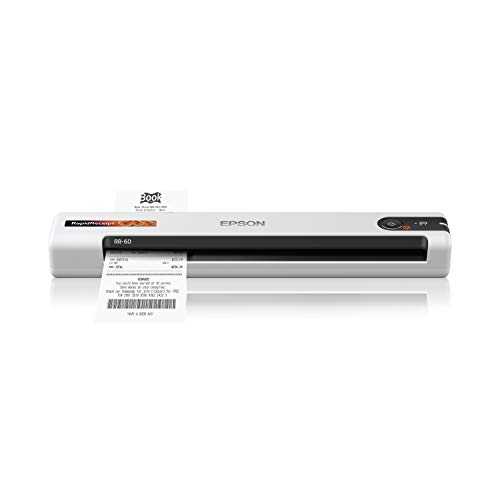
Epson RapidReceipt RR-60
The RR-60 shrinks the RapidReceipt idea down to a mobile scanner that runs entirely from a USB connection, with no separate power adapter to carry. It feeds one sheet at a time and scans at up to 10 pages per minute in its automatic feeding mode, which is plenty for a freelancer or salesperson clearing a wallet of receipts at the end of a trip. Epson describes it as the smallest and lightest mobile single-sheet scanner in its class.
Crucially, it still includes receipt management software with no subscription required, so the data extraction that makes the desktop models useful is not lost by going small. It creates searchable and editable PDFs and handles long pages as well as standard documents. This is the pick for light, occasional scanning where desk space and portability matter more than batch speed.
Specs
- Scanner type: Mobile single-sheet receipt and color document scanner
- Connectivity: USB, USB-powered
- Resolution: 600 dpi
- Scan speed: Up to 10 pages per minute in automatic feeding mode
- Document size: Handles pages up to 8.5 by 72 inches per the listing
- Software: Receipt management and PDF software included, no subscription required
- Compatibility: PC and Mac
- Weight: Confirm on the listing
Brother DS-640
The Brother DS-640 is the budget-friendly end of this category: a compact mobile scanner, under a foot long, that draws power from the included micro USB 3.0 cable and scans color and black-and-white documents at up to 16 pages per minute. It feeds one sheet at a time and handles documents up to 72 inches long, including invoices and receipts, so long register tapes are not a problem.
Brother’s driver support is a quiet strength here, covering Windows, Mac, and Linux, which makes the DS-640 an easy fit for mixed households and older computers. It does not include dedicated receipt data-extraction software like the Epson models, so scanned receipts arrive as files you organize yourself. For occasional scanning on a tight budget, that trade is reasonable.
Specs
- Scanner type: Compact mobile document scanner; media types include receipts
- Connectivity: USB, powered through the included micro USB 3.0 cable
- Scan speed: Up to 16 pages per minute for color and black-and-white
- Feeder: Single-sheet feed
- Dimensions: 11.9 by 2.2 by 1.4 inches
- Document length: Up to 72 inches per the listing
- Compatibility: Windows, Mac, and Linux
- Weight: Confirm on the listing
How to Choose
Start with volume. If you scan receipts in batches of fifty or more, a desktop model with a large auto document feeder and two-sided scanning, like the RR-600W or RR-620W, will save real time. If you scan a few receipts a week, a single-sheet mobile model is slower per page but costs less and stores in a drawer.
Next, think about software, because that is where receipt scanners earn their keep. Models with receipt management software extract vendor names, dates, and totals automatically and export tidy records for tax preparation or bookkeeping. A basic scanner without that software still digitizes the paper, but you do the organizing by hand.
Then check connectivity and compatibility. Wi-Fi models can sit anywhere and serve more than one computer, while USB models are simpler and never fight with your network. Confirm the scanner supports your operating system, especially if you use Linux or an older Mac, and look at the longest document each model accepts if you deal with long register receipts.
Who Should Skip
Skip a dedicated receipt scanner if you only handle a few receipts a year; a phone scanning app and a labeled folder will do the job for free. Also skip the desktop models if you have no permanent desk space, since a feeder scanner that lives in a closet rarely gets used. If your real problem is thousands of mixed office documents rather than receipts, look at general high-volume document scanners instead. And if your receipts already arrive digitally by email, there is nothing to scan; put the money toward accounting software instead.
FAQ
Do receipt scanners work with faded thermal paper receipts?
Yes, within limits. Receipt scanners are built for thin, narrow paper, and the software can often enhance faint text during scanning. Very faded receipts may still lose detail, so scan important receipts sooner rather than later, because thermal prints keep fading in storage.
Can these scanners send data to accounting software?
The Epson RapidReceipt models include software designed to extract receipt data and organize it for use with common accounting and tax workflows. The Canon and Brother models focus on producing searchable files, so check the listing for the exact export options your bookkeeping setup needs.
Is a receipt scanner better than a phone app?
For a handful of receipts, a phone app is fine. A dedicated scanner wins on speed and consistency when volume grows: feeders process stacks automatically, both sides are captured in one pass, and long receipts feed through flat instead of being stitched together from photos.
Do I need Wi-Fi in a receipt scanner?
No. Wi-Fi adds placement flexibility and lets several people share one scanner, but USB models are simpler to set up and work anywhere a laptop works, which is why the mobile picks in this guide are USB-powered. Choose based on where and how you actually scan.
Final Verdict
For most households and small businesses, the Epson RapidReceipt RR-600W is the balanced pick: a big feeder, two-sided scanning, wireless placement, and software that turns receipts into organized data. Step up to the RR-620W if your scanning volume is heavy and constant. The Canon imageFORMULA R40 is the better fit when receipts share the pile with general office documents. On a budget or on the move, the Epson RR-60 keeps the receipt software in a portable body, and the Brother DS-640 covers basic digitizing for the least money and space.


FAQ
Do receipt scanners work with faded thermal paper receipts?
Can these scanners send data to accounting software?
Is a receipt scanner better than a phone app?
Do I need Wi-Fi in a receipt scanner?
More from Amazon
Programs that pair well with the guide above. Offers and eligibility are set by Amazon and may change.
Free shipping on eligible items, Prime Video and more. Eligible new members can start with a free trial.
Start a Prime free trialAudiobooks and podcasts to listen to on the go. Eligible new members can start with a free trial.
Try Audible freeAd-free music streaming. Eligible new subscribers can start with a free trial.
Try Music Unlimited freeA free business account with business pricing and bulk-buying tools for work, shop or home office.
Create a business accountAs an Amazon Associate we earn from qualifying purchases.