
Key takeaways
- M.2 slot under the graphics card: On most ATX and mATX boards, the primary M.2 slot sits directly beneath the PCIe x16 slot. A dual-slot GPU leaves roughly 10–11mm of vertical room; a triple-slot GPU leaves less. Heatsinks taller than ~11mm simply won’t install.
- PS5 expansion slot: Sony specifies a maximum total height of 11.25mm for the drive plus heatsink, measured from the slot floor to the metal cover. Heatsinks taller than ~8mm on the drive side risk preventing the cover from closing.
- Open slot above the GPU or on the board edge: Here you can use tower-style coolers 20–40mm tall, which deliver the largest temperature drops.
The best M.2 SSD heatsinks for NVMe drives are tall aluminum-and-heatpipe units like the Thermalright HR-09 2280 Pro when you have GPU-side clearance, low-profile blocks like the be quiet! MC1 when you don’t, and slim Sony-spec-compliant designs like the Sabrent PS5 heatsink for console installs — the right pick depends almost entirely on the vertical space above your drive slot, not on price.
Our top picks



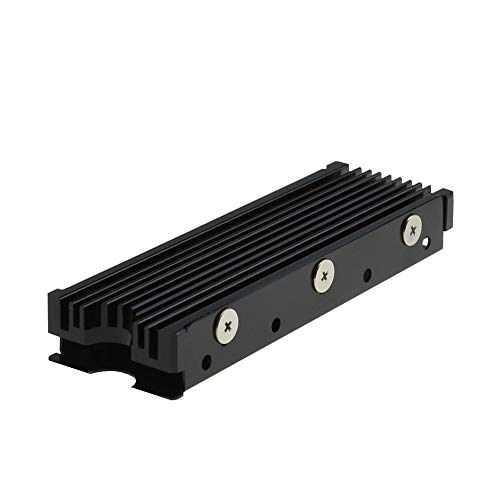
As an Amazon Associate we earn from qualifying purchases at no extra cost to you. Ratings are shown as listed on Amazon.
Why clearance, not cooling power, decides your heatsink
A modern Gen4 or Gen5 NVMe controller can hit 80–90°C under sustained writes and throttle hard, so a heatsink matters. But the most common buying mistake isn’t choosing a weak cooler — it’s choosing one that physically doesn’t fit. Three scenarios dominate:
- M.2 slot under the graphics card: On most ATX and mATX boards, the primary M.2 slot sits directly beneath the PCIe x16 slot. A dual-slot GPU leaves roughly 10–11mm of vertical room; a triple-slot GPU leaves less. Heatsinks taller than ~11mm simply won’t install.
- PS5 expansion slot: Sony specifies a maximum total height of 11.25mm for the drive plus heatsink, measured from the slot floor to the metal cover. Heatsinks taller than ~8mm on the drive side risk preventing the cover from closing.
- Open slot above the GPU or on the board edge: Here you can use tower-style coolers 20–40mm tall, which deliver the largest temperature drops.
Measure first. Take the GPU out, hold a ruler vertically over the M.2 slot, and note the gap. That number — minus ~1mm safety margin — is your maximum heatsink height.
Top picks by situation
Tallest budget tower: Thermalright HR-09 2280 Pro
A two-heatpipe, finned aluminum tower around 27mm tall that has become the default recommendation for open slots. It typically costs under $15 and delivers some of the largest drops measured across any M.2 cooler — commonly 15–25°C under sustained load versus a bare drive. Only usable where nothing sits above the slot.
Low-profile under-GPU pick: be quiet! MC1 / MC1 Pro
The MC1 is a compact aluminum block roughly 10mm tall designed specifically for sandwiched slots. Expect 8–15°C improvement over bare or thin stock shielding. The MC1 Pro adds a small heatpipe for a few extra degrees in the same footprint. If your motherboard already has a thick M.2 shield, the gain shrinks to 5°C or less — check whether your board’s armor is actually doing the job first.
PS5 pick: Sabrent M.2 NVMe PS5 heatsink
A machined aluminum unit shaped to the PS5’s slot geometry, replacing the slot cover entirely so heat vents into the console’s airflow channel rather than fighting the closed metal lid. Fits within Sony’s 11.25mm envelope. Generic low-profile heatsinks also work if total drive-plus-heatsink height stays under 11.25mm, but the dedicated design is the safer bet.
Value multi-packs: Glotrends / icepc-style slim coolers
Generic aluminum finned heatsinks in the 6–11mm range, often sold in two-packs for under $12. Performance is a modest 5–12°C drop, but they’re the only option for some laptop-adjacent or ultra-tight builds. Verify the exact listed height — listings in this category are inconsistent.
Comparison at a glance
| Heatsink | Height | Type | Fits under dual-slot GPU? | PS5-safe? | Typical temp drop* | Price range |
|---|---|---|---|---|---|---|
| Thermalright HR-09 2280 Pro | ~27mm | 2-heatpipe tower | No | No | 15–25°C | $10–18 |
| be quiet! MC1 | ~10mm | Aluminum block | Yes (tight) | Marginal — check drive height | 8–15°C | $12–18 |
| be quiet! MC1 Pro | ~10mm | Block + heatpipe | Yes (tight) | Marginal | 10–17°C | $15–22 |
| Sabrent PS5 heatsink | Slot-cover design | Machined aluminum | N/A | Yes | 10–20°C (console) | $15–25 |
| Slim finned generics (Glotrends etc.) | 6–11mm | Finned aluminum | Usually | Some | 5–12°C | $8–14 (often 2-pack) |
*Drop ranges reflect figures commonly reported in reviews and community thermal testing under sustained write loads versus a bare drive. Gen5 drives benefit most; cool-running Gen3 drives may only need 5°C of help.
Thermal pads: the spec listings hide
The pad thickness matters as much as the aluminum. Most single-sided NVMe drives have a controller ~1.5–2mm above the PCB with NAND packages at different heights — a single rigid pad can’t contact both evenly.
- Stock pads on budget heatsinks are often 1mm silicone rated ~3–6 W/m·K. They work, but they’re the first thing to upgrade.
- Better approach: soft 1.5–2mm pads rated 8+ W/m·K (Thermal Grizzly Minus Pad 8, Gelid GP-Extreme and similar) compress to bridge uneven component heights. Softer compound beats higher conductivity here — a 12 W/m·K pad that doesn’t fully contact the controller transfers less heat than a 6 W/m·K pad that does.
- Double-sided drives need a heatsink with a bottom plate or two-piece design so the rear NAND also gets a pad against something solid. A top-only heatsink on a double-sided drive cools asymmetrically and can trap heat underneath.
- Never stack two pads. If the gap is too large for one pad, you have the wrong heatsink height, not a padding problem.
Installation in five steps — and what goes wrong
- 1. Peel the controller label? Usually no. Most warranties and brands warn against removing it, and the label is thin enough not to matter thermally. Leave it.
- 2. Test-fit dry. Confirm the heatsink clears the GPU backplate or PS5 cover before bonding anything.
- 3. Apply pads to the heatsink, not the drive. Easier alignment; pull the protective film last.
- 4. Use the rubber-band/clips supplied, evenly tensioned. Lopsided clamping bows thin PCBs.
- 5. Verify with software. Check idle and load temps via the drive’s SMART data (CrystalDiskInfo, HWiNFO, or the vendor toolbox). A properly installed heatsink should show controller temps 10°C+ lower within a few days of normal use.
Common failures: forgetting the pad film (heatsink does nothing), mounting the drive offset so the pad misses the controller, and assuming the motherboard’s decorative M.2 shield is already adequate — many are thin steel with a poor pad and are worth replacing.
Ownership realities
Heatsinks have no moving parts, but the pads are the wear item. Silicone pads slowly dry and pump out over years of thermal cycling — if you ever remount the drive, replace the pad rather than reusing a compressed one ($5–8 for a sheet that covers several drives). Anodized finishes hold up indefinitely; thermal grease-based pads don’t degrade the way CPU paste does since the contact is compression, not a thin film. Also note: a tall heatsink in a cramped case can obstruct side-panel airflow or interfere with some AIO tube routing — another reason tower styles belong in open slots only.
Decision matrix
| Your situation | Best choice |
|---|---|
| M.2 slot trapped under a GPU | be quiet! MC1/MC1 Pro or a ≤10mm slim cooler |
| PS5 storage expansion | Dedicated PS5-cover heatsink (Sabrent-style) |
| Open slot, Gen5 drive, heavy writes | Thermalright HR-09 Pro tower |
| Double-sided drive | Two-piece cooler with base plate + rear pad |
| Light-use Gen3 drive, tight budget | Motherboard shield may suffice; else an $8–10 slim heatsink |
FAQ
Do Gen4 drives really need a heatsink?
Most do under sustained load. Controllers like Phison E18-class chips throttle around 70–80°C. For pure gaming and light use, a motherboard shield is often enough; for large file transfers or content work, add real cooling.
Will a heatsink fix a drive that’s already throttling?
Usually yes if the controller is the bottleneck, but check temps first — sometimes a poorly placed drive is simply sitting in a dead-air zone and needs case airflow more than a bigger heatsink.
Does heatsink weight matter for vertical mounting?
Tower units put some cantilevered load on the M.2 slot when the board is vertical. The screw-down mounting holds fine in practice, but slim coolers eliminate the concern entirely in small-form-factor builds.
