Key takeaways
- Compare five budget monitor arms for single and dual setups, with checks on screen size, weight capacity, VESA fit, clamp style and cable routing.
- Top Pick: VIVO Single Monitor Arm Desk Mount (STAND-V001W)
- Runner-up: MOUNTUP Single Monitor Desk Mount (MU0004)
- Also consider: HUANUO Gas Spring Single Monitor Arm (HNSSK1)
A monitor on its factory stand usually sits too low or too close, and the stand eats the exact patch of desk where a keyboard or notebook wants to go. A monitor arm fixes all of that at once: it lifts the screen to eye level, lets it float back over the rear edge of the desk, and frees the footprint underneath. Better still, this is one of the most competitive corners of the home office market, and entry-level arms from established mount brands cover the standard VESA patterns, hold typical office monitors, and include cable routing without drifting into premium territory.
This guide rounds up five budget monitor arms for single and dual screen setups, focusing on the specs that decide whether an arm works in a real room: the screen size and weight range it supports, whether it clamps or bolts through the desk, how much height and reach it offers, and whether the VESA plate detaches for an easier install.
As an Amazon Associate, we earn from qualifying purchases.
Quick Answer
For one screen, the VIVO STAND-V001W is the simplest budget route: a pole-style arm that holds up to 22 pounds, fits VESA 75×75 and 100×100 patterns, and clamps or bolts through the desk. For smoother one-hand moves, pick a gas spring model like the MOUNTUP MU0004. For two screens, the VIVO STAND-V002 carries a matched pair on a single clamp.
The Picks
VIVO Single Monitor Arm Desk Mount (STAND-V001W)

The STAND-V001W is the classic pole-style design that anchors most budget setups. The monitor rides on a center pole, so height is set by sliding the arm along the pole and locking it in place, while the arm itself tilts, swivels, and rotates for portrait work. VIVO rates it for regular screens up to 32 inches and ultrawide screens up to 38 inches, covering the large majority of home office monitors. With no spring to balance, it suits a screen positioned once and left alone, and the detachable VESA plate means the monitor hooks onto the arm rather than being held in place while screws are driven.
Specs:
– Screen fit: up to 32 inches regular, up to 38 inches ultrawide
– Weight capacity: up to 22 pounds
– VESA patterns: 75x75mm and 100x100mm
– Mounting: heavy-duty C-clamp or optional grommet base
– Movement: tilt plus 90 to minus 90 degrees, 360 degree swivel and rotation, height adjustment along the center pole
– Build: aluminum and steel, white finish
– Warranty: 3 year manufacturer warranty per the listing
MOUNTUP Single Monitor Desk Mount (MU0004)
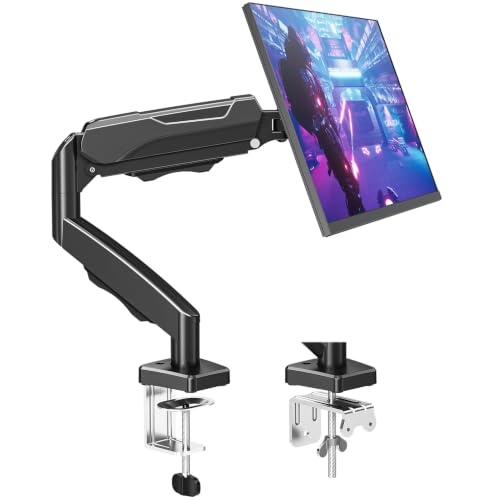
The MU0004 is a gas spring arm, and that spring is the reason to pick it over a pole mount: once the tension is dialed in for your monitor’s weight, the screen can be raised, lowered, and pulled closer with one hand and stays where it is left. It fits screens up to 32 inches in the common 4.4 to 17.6 pound band, covering most 24 and 27 inch office monitors. The clamp range is unusually generous, spanning desks from 0.39 to 4.53 inches thick, so thick butcher-block style desktops that defeat smaller clamps are still in play. One caution from the listing: strongly curved screens with 1000R, 1500R, or 1800R curves are not compatible, so owners of aggressive curved gaming panels should pick the pole mount above instead.
Specs:
– Screen fit: up to 32 inches, flat and curved (strongly curved 1000R to 1800R screens excluded per the listing)
– Weight capacity: 4.4 to 17.6 pounds
– VESA patterns: 75x75mm and 100x100mm
– Mounting: C-clamp for desks 0.39 to 4.53 inches thick, or grommet base for desks 0.39 to 3.15 inches thick
– Movement: gas spring arm, tilt plus 90 to minus 45 degrees, 180 degree swivel, 360 degree rotation
– Extras: built-in cable management, mounting hardware and manual included
– Support: 3 year support per the listing
HUANUO Gas Spring Single Monitor Arm (HNSSK1)

The HNSSK1 is HUANUO’s long-running entry-level gas spring arm, and its party trick is in the box: an HDMI cable is included. The rated load band starts lower than most, at 3.3 pounds, so very light monitors that make other springs shoot upward are still balanced here. Height travel comes two ways, a 14.3 inch pole plus 12.2 inches of gas spring adjustment, giving more total lift than a short arm alone. Tilt range is narrower than the MOUNTUP’s at plus 35 to minus 35 degrees, enough for glare control but worth knowing if you angle a screen sharply. HUANUO also warns against mounting it on particle board or glass desktops.
Specs:
– Screen fit: 17 to 32 inches
– Weight capacity: 3.3 to 17.6 pounds
– VESA patterns: 75x75mm and 100x100mm
– Mounting: C-clamp or grommet base
– Movement: gas spring arm, tilt minus 35 to plus 35 degrees, arm swivel 180 degrees, screen swivel 90 degrees each way, 360 degree rotation
– Pole height: 14.3 inches, with 12.2 inches of gas spring height adjustment
– Extras: detachable VESA plate, HDMI cable included per the listing
VIVO Counterbalance Mechanical Monitor Arm (STAND-V001O)

The STAND-V001O takes a different route to fingertip adjustment: a mechanical spring counterbalances the monitor instead of a gas strut, with toolless placement once the counterbalance is set. Its supported band of 4.4 to 19.8 pounds is the widest in this guide, reaching heavier 32 inch screens that the gas arms above would struggle to hold level. The open-top VESA plate is a real convenience: the monitor slides down onto it rather than needing support while fasteners are started.
Specs:
– Screen fit: 17 to 32 inches
– Weight capacity: 4.4 to 19.8 pounds
– VESA patterns: 75x75mm and 100x100mm
– Mounting: C-clamp or grommet base (confirm desk thickness range on the listing)
– Movement: mechanical spring counterbalance arm, tilt plus 90 to minus 90 degrees, 180 degree swivel, 360 degree rotation
– Install detail: open-top slide-on VESA plate, hardware and instructions included
VIVO Dual Monitor Desk Mount (STAND-V002)

The STAND-V002 is the budget answer for two screens: two arms on one center pole, held by a single clamp, so a matched pair of monitors lifts together without buying two separate mounts. Each side is rated for screens from 13 to 30 inches and up to 22 pounds, with height adjusted along the shared pole. That shared design is also the trade-off: both screens sit at the same pole height, so two identical monitors align beautifully, while two very different screen sizes may not line up along their top edges.
Specs:
– Screen fit: two screens, 13 to 30 inches each
– Weight capacity: up to 22 pounds per screen
– VESA patterns: 75x75mm and 100x100mm
– Mounting: heavy-duty C-clamp for desks up to 3.25 inches thick, or optional grommet mount
– Movement: tilt plus 90 to minus 90 degrees, 180 degree swivel, 360 degree rotation, height adjustment along the center pole
– Extras: detachable VESA plates, cable management clips included
– Warranty: 3 year manufacturer warranty per the listing
How to Choose a Budget Monitor Arm
Start with the weight of your monitor, not its size. Screen weight without its stand is printed in the monitor’s spec sheet, and it must fall inside the arm’s rated band, not just under the maximum. Spring arms also have a minimum: a screen lighter than the lower limit drifts upward however the tension is set. The MOUNTUP and VIVO counterbalance arms here start at 4.4 pounds; the HUANUO starts at 3.3 pounds.
Next, confirm the VESA pattern. Nearly every monitor in this class uses 75x75mm or 100x100mm mounting holes, and all five arms here cover both. If your monitor has no VESA holes at all, common on the thinnest budget displays, an arm cannot attach without a separate adapter bracket matched to your exact model.
Then look at your desk. A C-clamp needs a solid rear edge and a thickness inside the clamp’s range, and it should not be trusted on glass tops or crumbly particle board. If the desk has a cable grommet hole, the grommet option usually gives a cleaner, stronger hold. Measure first, because clamp range is the most common reason a budget arm gets returned.
Finally, decide how often the screen will actually move. A pole mount like the STAND-V001W or the dual STAND-V002 is set with tools and then left alone, fine for a fixed workstation. If the desk is shared, or the monitor swings between sitting and standing positions, a spring arm such as the MU0004, HNSSK1, or STAND-V001O earns its keep daily. Also leave a little space behind the desk: articulating arms fold backward, and a desk flush against a wall limits how far the screen pushes back.
Who Should Skip a Budget Monitor Arm
Skip these arms if your monitor is heavier than 22 pounds without its stand, as most large ultrawide and older displays are; that job belongs to heavy-duty arms with higher ratings. Skip them if your desk is glass, very thin, or has a beveled rear edge a clamp cannot grip squarely. Renters who cannot risk marks on a desk edge may prefer a freestanding VESA stand, which sits on the desk rather than clamping to it. And if your monitor already has a height-adjustable stand that reaches a comfortable eye level, an arm adds reach and desk space but not comfort, so the money may be better spent on the chair or lighting.
FAQ
Will a budget monitor arm fit my monitor?
It will if two things line up: the monitor has a 75x75mm or 100x100mm VESA pattern on its back, and its weight without the stand falls inside the arm’s rated range. Check both figures in your monitor’s spec page before ordering, since screen size alone does not guarantee a match.
Is a gas spring arm better than a pole mount?
A gas spring arm is better if you reposition the screen often, because it moves with one hand and holds its position. A pole mount is simpler, has no spring to balance, and typically holds more weight for the money, but changing height means loosening, sliding, and re-tightening the arm on the pole.
Can one arm hold two monitors?
Single mounts cannot; each is balanced and rated for one screen. For two screens, use a dual mount like the VIVO STAND-V002, which carries one monitor per arm on a shared pole, or buy two single arms if the screens need very different heights.
Will a clamp arm damage my desk?
A correctly tightened clamp on a solid wood or laminate desk normally leaves no damage, and a thin pad under the clamp protects the finish. The real risk is structural: glass tops and weak particle board can crack under clamp pressure, so those desks should use a freestanding stand instead.
Final Verdict
For most budget desk builds, the VIVO STAND-V001W is the safe pick: broad screen fit, a 22 pound ceiling, both mounting styles in the box, and nothing to balance after install. If the screen will move every day, the MOUNTUP MU0004 and HUANUO HNSSK1 bring gas spring convenience, the HUANUO suiting very light monitors and the MOUNTUP thicker desktops. The VIVO STAND-V001O covers the heaviest screens in this guide with its mechanical counterbalance, and the STAND-V002 is the straightforward budget route to a tidy two-screen desk. Match the weight band and clamp range to your monitor and desk, and any of the five will do its job for years.
FAQ
Will a budget monitor arm fit my monitor?
Is a gas spring arm better than a pole mount?
Can one arm hold two monitors?
Will a clamp arm damage my desk?
More from Amazon
Programs that pair well with the guide above. Offers and eligibility are set by Amazon and may change.
Free shipping on eligible items, Prime Video and more. Eligible new members can start with a free trial.
Start a Prime free trialAudiobooks and podcasts to listen to on the go. Eligible new members can start with a free trial.
Try Audible freeAd-free music streaming. Eligible new subscribers can start with a free trial.
Try Music Unlimited freeA free business account with business pricing and bulk-buying tools for work, shop or home office.
Create a business accountAs an Amazon Associate we earn from qualifying purchases.