
Key takeaways
- One console, lowest ongoing hassle: Astro A10 (Gen 2), if a wired connection suits your seating position.
- Wireless gaming with fewer charging stops: Astro A20 X.
- Several consoles and a shared display: Astro A50 X, if its base-station routing fits your video setup.
- Wireless base station without HDMI passthrough: Astro A50 (Gen 5).
- Frequent play away from the transmitter: favor a clear wireless path and test your room layout; advertised range alone cannot predict dropouts.
Best Astro Gaming Headsets: Which One Should You Buy?
The best Astro gaming headset for most players is the Astro A50 X if you use multiple consoles or a PC and want easy source switching; for a lower-cost wireless pick, choose the Astro A20 X; and for a wired setup, the Astro A10 is the simplest value option. The right choice depends less on headline surround-sound claims than on your platform, connection setup, and how long you play between charges.
Astro Headsets Compared
Astro models can differ by generation and regional bundle, so check the exact model and platform designation before buying. The figures below are published specifications; wireless range and battery life can vary with interference, volume, and use.
Our top picks



As an Amazon Associate we earn from qualifying purchases at no extra cost to you. Ratings are shown as listed on Amazon.
| Headset | Connection and range | Platforms | Battery life | Weight | Best for |
|---|---|---|---|---|---|
| Astro A50 X | 2.4 GHz wireless; up to 12 m (40 ft) | PlayStation 5, Xbox Series X|S, PC/Mac; HDMI 2.1 base station handles console video passthrough | Up to 24 hours | 363 g | Multi-system setups and frequent switching |
| Astro A50 (Gen 5) | 2.4 GHz wireless; up to 12 m (40 ft) | PlayStation 5, Xbox Series X|S, PC/Mac; USB-C base station | Up to 24 hours | 363 g | Wireless gaming across systems without HDMI passthrough |
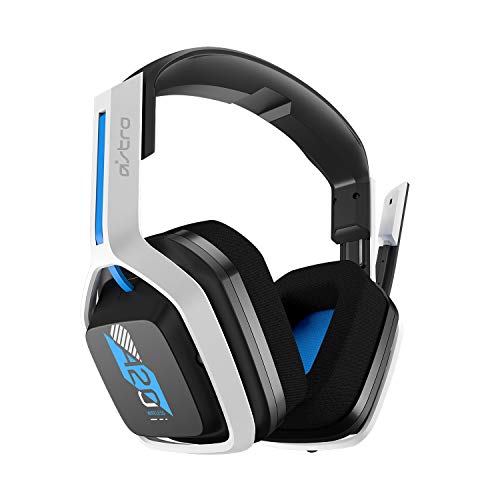
| Astro A20 X | 2.4 GHz wireless; up to 15 m (50 ft) | PlayStation 5, Xbox Series X|S, PC/Mac; USB transmitter | Up to 90 hours, depending on mode and use | 290 g | Long battery life and a lighter wireless headset |
| Astro A10 (Gen 2) | Wired, 3.5 mm | Compatible controllers, PCs, and devices with a headset jack | No battery | 246 g | Budget-conscious players and simple setups |
Weights are approximate and can vary slightly by version. The A50 X and A50 Gen 5 are premium products; the A20 X generally sits in the midrange, while the A10 is the budget option. Treat price as a broad market tier rather than a fixed figure: discounts and bundles change frequently.
Choose by Setup, Not Just by Sound
Best for switching between Xbox, PlayStation, and PC: Astro A50 X
The A50 X is the most convenient pick if several systems share one display. Its base station combines headset charging and switching, and its HDMI 2.1 connections can route console video through the station. That convenience comes with a setup trade-off: you need to connect the console and display through the base station and confirm that your video features—such as resolution and refresh rate—are supported by your full signal path. It is overkill if you play on one platform.
Best for long sessions without frequent charging: Astro A20 X
Choose the A20 X when battery life and a lighter fit matter more than a premium base station. Its long advertised runtime reduces charging interruptions, but real-world results depend on volume and wireless use. Its USB transmitter is a simpler connection than the A50 X’s HDMI-based console switching, though platform compatibility still depends on selecting the correct version and following the console’s USB audio settings.
Best for wireless multi-platform use without HDMI passthrough: Astro A50 (Gen 5)
The A50 Gen 5 is a strong middle ground for players who want a charging base and wireless use across supported systems but do not need the A50 X’s video-routing feature. Check how you will connect each device before purchasing; console support can involve moving the USB connection or changing the selected source, rather than the seamless switching some multi-device desks require.
Best for low cost and reliability: Astro A10 (Gen 2)
The A10 avoids batteries, pairing, and charging docks. Plug its 3.5 mm cable into a compatible controller or computer, and it is ready to use. The cable does limit movement, and a headset jack or suitable adapter is required. For a shared room or a player who often forgets to charge wireless gear, that simplicity can be more useful than extra features.
What the Specs Mean in Everyday Use
Wireless range is not the same as freedom from dropouts
Published range is usually measured under favorable conditions. Walls, neighboring wireless devices, and the transmitter’s position can reduce stable coverage. Keep the base station or USB transmitter in the same room and away from a cabinet, metal obstruction, or crowded USB hub. If you often walk into another room while playing, prioritize a clear path to the transmitter over a small difference in advertised range.
Microphone clarity depends on placement and chat settings
The A50 X, A50 Gen 5, and A20 X use boom microphones that can be positioned near the corner of your mouth. A clear mic is useful for party chat, but console chat processing, game audio balance, and room noise also affect what teammates hear. Before replacing a headset, check that the mic is not muted, set the console’s input device correctly, and adjust chat/game balance. The A10’s wired boom mic is a straightforward choice for basic voice chat.
Surround sound is partly a software decision
Astro headsets provide stereo drivers, while virtual surround or spatial audio is produced through compatible console or PC processing. These modes can make directional cues feel more distinct, but they are not a guarantee of better competitive performance; some players prefer stereo for clearer positional judgment. Avoid enabling multiple surround-processing layers at once, since combining headset software with console spatial audio can make sound less natural.
Comfort is personal, especially over long sessions
Headset weight is only one part of fit. Clamping force, ear-cup depth, heat, glasses, and head shape all matter. The A20 X is the lightest wireless option in this comparison by listed weight, while the A50 models are heavier but include a base station and charging setup. If possible, check the return policy and fit the headset for a full session before deciding it works for you.
Ownership: Charging, Cleaning, and Wear
On wireless A50 models, make a habit of returning the headset to its charging base and checking that its contacts align. If charging becomes intermittent, gently clean the contacts with a dry, lint-free cloth; do not scrape or wet them. The A20 X’s long runtime helps, but recharging before a tournament or trip is still sensible.
Across headsets, ear cushions and the headband are the parts most likely to show wear first. Wipe cushions with a soft, slightly damp cloth and let them dry fully; avoid soaking them or using harsh cleaners. Keep the cable on the A10 from being sharply bent at the plug, and do not pull the headset off by its cord. Replacement-part availability can change, so check compatibility with the exact model generation before ordering cushions or cables.
Quick Decision Guide
- One console, lowest ongoing hassle: Astro A10 (Gen 2), if a wired connection suits your seating position.
- Wireless gaming with fewer charging stops: Astro A20 X.
- Several consoles and a shared display: Astro A50 X, if its base-station routing fits your video setup.
- Wireless base station without HDMI passthrough: Astro A50 (Gen 5).
- Frequent play away from the transmitter: favor a clear wireless path and test your room layout; advertised range alone cannot predict dropouts.
For most buyers, platform compatibility should be the first filter, followed by connection convenience and fit. Pick the A50 X for an integrated multi-console setup, the A20 X for long-lasting wireless use, or the A10 if a dependable cable is all you need.
